Thursday, May 2, 2013

ADF With No Bindings: Simple Tables

In this post, I will describe how to work with simple tables without a binding layer in Oracle ADF Faces 11g RC.
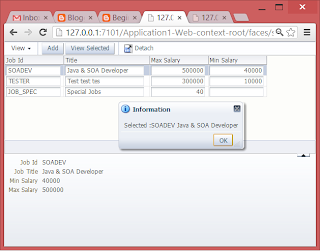

Summary:
  • Create a backing bean
  • Drop a <af:table/> component to the page
  • How to add new row
  • Managed row selection
  • Handling selection events

Create a backing bean

//package and import statements
public class SimpleTableForm {
    private List<Job> jobList;
    private RichTable jobTable;
    private RichPanelGroupLayout panelGroup1;

    public void setJobList(List<Job> jobList) {
        this.jobList = jobList;
    }

    public List<Job> getJobList() {
        if (jobList == null) {
            jobList = new ArrayList<Job>();
        }
        return jobList;
    }
//other codes

Drop a <af:table/> component to the page

When you drag and drop a table from the component palette, the "Create ADF Table" wizard will show. I highly recommend that you specify the Element Type so that JDeveloper will auto populate the corresponding columns for you.


How to add new row

To add a new row you just have to add a new item into the corresponding List that holds your data as in the following example:

//adds new row
    public void addJob(ActionEvent actionEvent) {
        Job job = new Job();
        getJobList().add(job);
    }
You need to set partial triggers to see the newly added row in the table.
<af:panelCollection id="pc1">
              <f:facet name="toolbar">
                <af:toolbar id="t2">
                  <af:commandToolbarButton text="Add" id="ctb1"
                                           actionListener="#{viewScope.simpleTableForm.addJob}"/>
                </af:toolbar>
              </f:facet>
              <af:table value="#{viewScope.simpleTableForm.jobList}" var="row"
                        rowBandingInterval="0" id="t1"
                        binding="#{viewScope.simpleTableForm.jobTable}"
                        rowSelection="single"
                        selectionListener="#{viewScope.simpleTableForm.tableRowSelected}"
                        partialTriggers="::ctb1">

Managed row selection

To get hold of the selected row, you have two options:
  1. Create an attribute selectedJob and update this value in a selectionListener. This seems better to avoid problems related to serialization of JSF components on scopes higher than request, but I prefer the next option.
  2. Bind the table component to the backing bean. Sometimes you need to manage the current selection on the table component, perhaps to make the newly added row as the current row. The serialization issue can be resolve through the use of "org.apache.myfaces.trinidad.util.ComponentReference" class.
    Code below shows a table component bind in the backing bean using a ComponentReference:
    private ComponentReference<RichTable> jobTable;
        
        public void setJobTable(RichTable jobTable) {
            if(this.jobTable == null){
                this.jobTable = ComponentReference.newUIComponentReference(jobTable);
            }
        }
    
        public RichTable getJobTable() {
            return jobTable == null? null: jobTable.getComponent();
        }
    
    Below is an updated code to make the newly added row as currently selected.
    public void addJob(ActionEvent actionEvent) {
            Job job = new Job();
            getJobList().add(job);
            RichTable table = getJobTable();
            RowKeySet selection = table.getSelectedRowKeys();
            selection.clear();
            selection.add(getJobList().size() - 1);
        }
    
    View selected row...
    public Job getSelectedJob() {
            RichTable table = getJobTable();
            if (table.getEstimatedRowCount() > 0) {
                return (Job)getJobTable().getSelectedRowData();
            }
            return null;
        }
        
        public void viewSelected(ActionEvent actionEvent) {
            Job selected = getSelectedJob();
            String msg = null;
            if (selected != null) {
                msg = "Selected :" + selected.getJobId() + " " + selected.getJobTitle();
            } else {
                msg = "No selection.";
            }
            FacesMessage fm =
                new FacesMessage(FacesMessage.SEVERITY_INFO, msg, "");
            FacesContext.getCurrentInstance().addMessage(null, fm);
        }
    

Handling selection events

Simple tables based on ordinary list object does not throw selection events which you can use as partial triggers. In order to update some part of the page in response to a user selection, you need to add a selection listener and addPartialTarget the corresponding component from there as in the following example:
public void tableRowSelected(SelectionEvent selectionEvent) {
        AdfFacesContext.getCurrentInstance().addPartialTarget(getPanelGroup1());
    }

Further thoughts

I hope you learned something from this simple post. In the next post, I will explain the "CollectionModel".

Friday, April 26, 2013

MDI Remote/Fragment BTF Adapter (Whatever!)

After a long void, I'm back!

Overview

Sometime ago, I wonder if we could deploy many small applications and access them on a central application. This is to avoid redeployment of the whole application every time there are new pages being created. Just as the the Oracle Forms and Reports developers are used to, they develop a form, compile, and put the compiled form on a directory and voila!, the form can be accessed by the user.

I also wonder if the bounded task flows (BTF) that we have created that are based on fragments can be displayed on a new browser window or even displayed as region on a remote application...


Then the solution, a remote task flow adapter. I really find it hard naming it. but what it does is that it allows BTFs based on fragments to be accessed remotely and also allows the same fragments to be displayed on a separate browser tab or window, thus simulating a Multiple Document Interface application.

Indeed, the bounded task flow concept in Oracle ADF is very powerful but that is only if you have properly designed your task flow. Proper task flow design is beyond the scope of this post, but the most relevant so far are the following:

  • Loose coupling - all dependencies should be defined in the task flow input parameters
  • Simple parameters - input parameters should be simple types like String, Integer, Long, Boolean, BigDecimal, etc...
  • Use of Contextual Events to communicate with the outside world.
  • Task flows should have task flow return activities (exit points)
To display remote task flow as region, we need an inline frame. This is because remote task flows are not based on fragments and thus cannot be put directly on a region.

In the context of the UI Shell, we need a way for the dynamic tab to close, if the remote task flow that is displayed in our inline frame has already returned (committed, rollback...). for the inline frame to communicate back to the containing page and initiate the closure of the tab, we need a hidden button and a javascript.
remote_wrapper.jspx
<?xml version='1.0' encoding='UTF-8'?>
<jsp:root xmlns:jsp="http://java.sun.com/JSP/Page" version="2.1"
          xmlns:af="http://xmlns.oracle.com/adf/faces/rich"
          xmlns:f="http://java.sun.com/jsf/core">
  <af:panelStretchLayout id="psl1" bottomHeight="0px">
    <f:facet name="bottom">
      <af:panelGroupLayout id="pgl1">
        <af:commandButton text="Done" id="cbReturn" action="done"
                          binding="#{viewScope.taskFlowAdapter.returnButton}"
                          visible="false"/>
        <af:resource type="javascript" source="/js/util.js" />
      </af:panelGroupLayout>
    </f:facet>
    <f:facet name="center">
      <af:inlineFrame id="if1" inlineStyle="width:100%; height:100.0%;"
                      source="#{viewScope.taskFlowAdapter.remoteTaskFlowURL}"/>
    </f:facet>
  </af:panelStretchLayout>
</jsp:root>

util.js
function submitButton(id) {
    var button = AdfPage.PAGE.findComponentByAbsoluteId(id);
    AdfActionEvent.queue(button, true);
}
TaskFlowAdapterForm.java
This class holds the reference to the hidden button which it later pass the corresponding button client id to the RemoteWrapper taskflow. It also pass all the current task flow parameters to the RemoteWrapper task flow while converting the parameterMap Map object to a string representation of key-value pairs separated by colon: and items separated by semicolon;
package soadev.taskflowadapter.view.backing;

import java.io.Serializable;
import java.util.HashMap;
import java.util.Map;
import javax.faces.application.Application;
import javax.faces.context.FacesContext;
import oracle.adf.controller.ControllerContext;
import oracle.adf.controller.TaskFlowId;
import oracle.adf.controller.internal.metadata.NamedParameter;
import oracle.adf.controller.internal.metadata.TaskFlowInputParameter;
import oracle.adf.view.rich.component.rich.nav.RichCommandButton;
import oracle.adf.view.rich.context.AdfFacesContext;
import org.apache.myfaces.trinidad.util.ComponentReference;
import soadev.view.utils.TaskFlowUtils;

public class TaskFlowAdapterForm implements Serializable {
    private static final long serialVersionUID = 1L;
    private ComponentReference<RichCommandButton> returnButton;
    private String remoteTaskFlowURL;

    public TaskFlowAdapterForm() {
        super();
    }

    public void setReturnButton(RichCommandButton returnButton) {
        if (this.returnButton == null) {
            this.returnButton =
                    ComponentReference.newUIComponentReference(returnButton);
        }
    }

    public RichCommandButton getReturnButton() {
        return returnButton == null ? null : returnButton.getComponent();
    }

    public String getRemoteTaskFlowURL() throws Exception {
        if (remoteTaskFlowURL == null) {
            Map<String, Object> params = new HashMap<String, Object>();
            params.put("returnTaskFlowButtonId",
                       getReturnButton().getClientId(FacesContext.getCurrentInstance()));
            params.putAll(getThisTaskFlowParameterMap());
            Map map = (Map)params.remove("parameterMap");
            params.put("parameters", buildParameterString(map));
            remoteTaskFlowURL =
                    ControllerContext.getInstance().getTaskFlowURL(false,
                                                                   TaskFlowId.parse("/WEB-INF/taskflows/soadev/RemoteWrapper.xml#RemoteWrapper"),
                                                                   params);
            remoteTaskFlowURL = "/"+remoteTaskFlowURL+"&_adf.ctrl-state=13sn8t8l0t_659";
            System.out.println(remoteTaskFlowURL);
        }
        return remoteTaskFlowURL;
    }

    public Map<String, Object> getThisTaskFlowParameterMap() {
        Map<String, Object> result = new HashMap<String, Object>();
        Map<String, TaskFlowInputParameter> inputParamsMap =
            TaskFlowUtils.getCurrentTaskFlowInputParameters();
        FacesContext facesContext = FacesContext.getCurrentInstance();
        Application application = facesContext.getApplication();
        for (TaskFlowInputParameter paramDef : inputParamsMap.values()) {
            NamedParameter namedParameter = (NamedParameter)paramDef;
            String paramName = namedParameter.getName();
            String paramExpression = namedParameter.getValueExpression();
            Object paramValue =
                application.evaluateExpressionGet(facesContext, paramExpression,
                                                  Object.class);
            result.put(paramName, paramValue);
        }
        return result;
    }

    private String buildParameterString(Map<String, Object> parameterMap) {
        if (parameterMap == null) {
            return "";
        }
        StringBuilder sb = new StringBuilder();
        for (Map.Entry<String, Object> entry : parameterMap.entrySet()) {
            sb.append(entry.getKey());
            sb.append(":");
            sb.append(entry.getValue());
            sb.append(";");
        }
        return sb.toString();
    }

    private Map<String, Object> getPageFlowScope() {
        return AdfFacesContext.getCurrentInstance().getPageFlowScope();
    }
}
This task flow pattern is derived from the BPM workspace. This is how the BPM workspace dsplays the task details on the same page as the task list. The method call gives the worklist app a way to update the task list after the user invokes an action in the task details form.

RemoteWrapperForm.java
This class only holds the method action that will be invoked when the remote taskflow has return, thus triggering the fragment that has the inline frame to return as well.
package soadev.taskflowadapter.view.backing;
import java.io.Serializable;
import javax.faces.context.FacesContext;
import oracle.adf.view.rich.context.AdfFacesContext;
import org.apache.myfaces.trinidad.render.ExtendedRenderKitService;
import org.apache.myfaces.trinidad.util.Service;

public class RemoteWrapperForm implements Serializable {
    private static final long serialVersionUID = 1L;

    public String returnTaskFlow() {
        String returnTaskFlowButtonId =
            (String)AdfFacesContext.getCurrentInstance().getPageFlowScope().get("returnTaskFlowButtonId");
        String refreshScript =
            "function returnTaskFlow() { this.parent.submitButton('" +
            returnTaskFlowButtonId + "');} returnTaskFlow();";
        FacesContext fc = FacesContext.getCurrentInstance();
        ExtendedRenderKitService service =
            Service.getRenderKitService(fc, ExtendedRenderKitService.class);
        service.addScript(fc, refreshScript);
        return "success";
    }
}
The FragmentWrapper taskflow made it possible for the BTF based on fragments to be accessed remotely. It also supports taskflow calls in case the BTF being wrapped wanted to launch some details.
Figure above shows the unlimited dialogs that you can launch from the FragmentWapper taskflow

FragmentWrapperForm.java
This class does the conversion of String parameters taken from the url to appropriate simple types. The parameter types were derived from the parameter definition of the bounded taskflows. This also holds a region navigation listener to return the containing FragmentWrapper.xml taskflow. If its inside a dynamic tab shell then the tab will close.
package com.soadev.view;

import java.io.Serializable;
import java.io.UnsupportedEncodingException;

import java.math.BigDecimal;

import java.net.URLDecoder;

import java.util.HashMap;
import java.util.Map;

import oracle.adf.controller.TaskFlowId;
import oracle.adf.controller.internal.metadata.TaskFlowDefinition;
import oracle.adf.controller.internal.metadata.TaskFlowInputParameter;
import oracle.adf.view.rich.component.rich.nav.RichCommandButton;
import oracle.adf.view.rich.event.RegionNavigationEvent;

import org.apache.myfaces.trinidad.util.ComponentReference;

import soadev.view.utils.ADFUtils;
import soadev.view.utils.JSFUtils;
import soadev.view.utils.TaskFlowUtils;


public class FragmentWrapperForm implements Serializable {
    private static final long serialVersionUID = 1L;
    private TaskFlowId taskFlowId;
    private transient Map<String, Object> parameterMap;
    private ComponentReference<RichCommandButton> launcherButton;


    public FragmentWrapperForm() {
    }

    private Object convert(String input, String type) {
        if (type == null) {
            return input;
        }
        if ("java.lang.Long".equals(type)) {
            return Long.valueOf(input);
        }
        if ("java.lang.Integer".equals(type)) {
            return Integer.valueOf(input);
        }
        if ("java.math.BigDecimal".equals(type)) {
            return new BigDecimal(input);
        }
        if ("java.lang.Boolean".equals(type)) {
            return Boolean.valueOf(input);
        }
        return input;
    }

    public TaskFlowId getDynamicTaskFlowId() {
        if (taskFlowId == null) {
            String taskFlow =
                (String)ADFUtils.getPageFlowScope().get("taskFlowId");
            try {
                taskFlow = URLDecoder.decode(taskFlow, "UTF-8");
            } catch (UnsupportedEncodingException e) {
                e.printStackTrace();
            }
            System.out.println("taskFlow: " + taskFlow);
            taskFlowId = TaskFlowId.parse(taskFlow);
        }
        return taskFlowId;
    }

    public void regionNavigationListener(RegionNavigationEvent regionNavigationEvent) {
        String newViewId = regionNavigationEvent.getNewViewId();
        System.out.println("regionNavigationListener " + newViewId);
        if (newViewId == null) {
            //there is no turning back
            //trans committed or rolledback already
            JSFUtils.handleNavigation(null, "done");
        }
    }

    public Map<String, Object> getParameterMap() {
        if (parameterMap == null) {
            parameterMap =
                    (Map<String, Object>)ADFUtils.getPageFlowScope().get("parameterMap");
            if (parameterMap == null) {
                parameterMap = new HashMap<String, Object>();
                TaskFlowDefinition definition =
                    TaskFlowUtils.getTaskFlowDefinition(getDynamicTaskFlowId());
                if (definition == null ||
                    definition.getInputParameters() == null) {
                    return parameterMap;
                }
                String parameters =
                    (String)ADFUtils.getPageFlowScope().get("parameters");
                if (parameters != null && !";".equals(parameters)) {
                    String[] parameterArray = parameters.split(";");
                    for (String pair : parameterArray) {
                        String[] parameter = pair.split(":");
                        String name = parameter[0];
                        TaskFlowInputParameter param =
                            definition.getInputParameters().get(name);
                        if (param != null) {
                            Object value =
                                convert(parameter[1], param.getType());
                            parameterMap.put(name, value);
                        }

                    }
                }
            }
        }
        return parameterMap;
    }

    public void setLauncherButton(RichCommandButton launcherButton) {
        if (this.launcherButton == null) {
            this.launcherButton =
                    ComponentReference.newUIComponentReference(launcherButton);
        }
    }

    public RichCommandButton getLauncherButton() {
        return launcherButton == null ? null : launcherButton.getComponent();
    }
}


Relevant Links/References

GitHub

You can download the full source at the following link:

To be continued...

Its been a long time since I was able to make a blog post... and today I've been working endlessly but seemed cant make it done. I rather post it incomplete than leave it doomed forever... Cheers!