Showing posts with label ADF UI Shell. Show all posts

Thursday, July 28, 2011

Custom BPM Workspace Deployed in a Non-SOA Server in a Different Domain

In my previous post, I demonstrated through a sample application how to utilize the reusable task flows from BPM Workspace. In this post, I will share the steps and configuration to deploy the custom application to a non-soa server located in a different domain.

The soa server in my case is a stand alone installation of Oracle SOA Suite with configured domain "base_domain" that supports SOA, BPM, and BAM.
The remote non-soa server is the default integrated weblogic server of JDeveloper using port "7101". The integrated weblogic server "DefaultServer" is in domain "DefaultDomain".

Steps and Configuration

There are four steps to successfully run the custom application:
  1. Set the "federatedMode" input parameter of the taskList task flow to true.
  2. Deploy all the referred libraries in the weblogic-application.xml and weblogic.xml to the non-soa server as follows:
    • oracle.soa.bpel
    • oracle.soa.workflow
    • oracle.bpm.runtime
    • oracle.bpm.client
    • oracle.bpm.projectlib
    • oracle.bpm.workspace
    • oracle.bpm.webapp.common
    • oracle.soa.worklist.webapp
    Note: If you are not using in your custom application the BPM related task flows but the task list, then you just need to deploy the oracle.soa.workflow.jar and oracle.soa.worklist.webapp.jar. These libraries are present in the sub directories in "$MIDDLEWARE_HOME$\jdeveloper\soa\modules".

  3. Add a properly configured wf_client_config.xml in the classpath. You can put the file inside "MyUIShellBPMApp\UIShellBPMWeb\src" directory. A sample wf_client_config.xml is as follows:
    <?xml version="1.0" encoding="UTF-8" standalone="yes"?>
    <workflowServicesClientConfiguration  xmlns="http://xmlns.oracle.com/bpel/services/client" clientType="REMOTE">
       <server default="true" name="default">
          <localClient>
             <participateInClientTransaction>false</participateInClientTransaction>
          </localClient>
          <remoteClient>
             <serverURL>t3://hoitpino:8001</serverURL>
             <initialContextFactory>weblogic.jndi.WLInitialContextFactory</initialContextFactory>
             <participateInClientTransaction>false</participateInClientTransaction>
          </remoteClient>
          <soapClient>
             <rootEndPointURL>http://hoitpino:8001</rootEndPointURL>
             <identityPropagation mode="dynamic" type="saml">
                <policy-references>
                   <policy-reference enabled="true" category="security" 
                    uri="oracle/wss10_saml_token_client_policy"/>
                </policy-references>
             </identityPropagation>
          </soapClient>
       </server>
    </workflowServicesClientConfiguration>
    
    
  4. Establish global trust between the domains.
    1. Login to the Oracle WebLogic Server console.
    2. Under Domain Structures, select the domain name like "base_domain".
    3. Select the Security tab.
    4. Click the Advanced link (near the bottom Save button.)
    5. Give some password in the "Credential" field. The same password should be used for the other domains.
    6. Click Save.
    7. Restart the server.

Running the application

Access the sample application from my previous post and follow the steps described above. Run the application by right clicking the main.jspx in JDeveloper, then run.

Below is a screenshot of my running application in integrated weblogic server:

Cheers!

Wednesday, July 27, 2011

Custom ADF UIShell Application with Oracle BPM Workspace Task Flows

An Excerpt from Appendix A (Creating Custom ADF Applications with Oracle Business Process Management Workspace Task Flows) of the Oracle Fusion Middleware User's Guide for Oracle Business Process Management 11g Release 1 (11.1.1.5.0)
Different features available in Process Workspace are exposed as standalone reusable components, called task flows. You can embed task flows in any Oracle Application Development Framework (ADF) application. These standalone task flows provide many parameters that enable you to build customized applications.
All the task flows are bundled in an ADF library that you can include in the application in which you are embedding.

Below are the notable steps that I have done to incorporate the BPM Workspace task flows into this custom ADF UI Shell application:
  1. I Added the BPM Worklist component in the class path. This library includes the adflibTaskListTaskFlow.jar that contains the reusable taskflows related to the standard worklist application.
  2. I want to display the "Process Tracking" and "Standard Dashboards" tabs, so I acquired the oracle.bpm.workspace-adflib.jar from a process portal installation and added it into the libraries and classpath.
  3. Modified the weblogic-application.xml to add some soa and bpm related library references. Please see the weblogic-application.xml in the artifacts section below.
  4. Added weblogic.xml descriptor that includes a library ref to the "oracle.soa.worklist.webapp" library. Please see artifacts section for the complete weblogic.xml
  5. With the jars configures from the steps above, the application is already deploying fine, but I encountered ClassNotFoundExceptions during runtime. I exploded the OracleBPMWorkspace application that ships with the standard Oracle Suite 11g R1 installation and noticed 4 additonal jars as part of the WEB-INF/lib directory, namely: oracle.bpm.security.jar; oracle.bpm.jsfcomponents.jar; oracle.bpm.workspace.adf.jar; oracle.bpm.workspace.model.jar; and oracle.bpm.web-resources.jar. I added them all to the libraries and class path.
  6. I configured ADF Security and added resource grants to the corresponding task flows. Ensure to mark check the "Show task flows imported from ADF libraries" checkbox located in the jaz-data.xml Overview tab.
  7. Tested the application by deploying it to a soa enabled weblogic server.

User Experience

Figure 1: Workspace Tasks Tab

To display the BPM Applications/ Initiable tasks in the left panel above, you also need to set the "taskFlowMode" parameter of the "taskList-task-flow-definition" to "workspace" and add the taskFlow binding "processApplicationsTaskflow1" on the same page definition. Please the see the complete taskListPageDef.xml page definition on the artifacts section below.


Figure 2: Workspace Process Tracking Tab

The process instances table is displaying, except for ONE BIG FAIL, it does not expose anything, like sort of contextual events- for example, so that the processInstanceDetailTaskflow can sync with the current selection on the processInstancesTaskflow. I hope I'm just wrong but the documentation is empty about this.


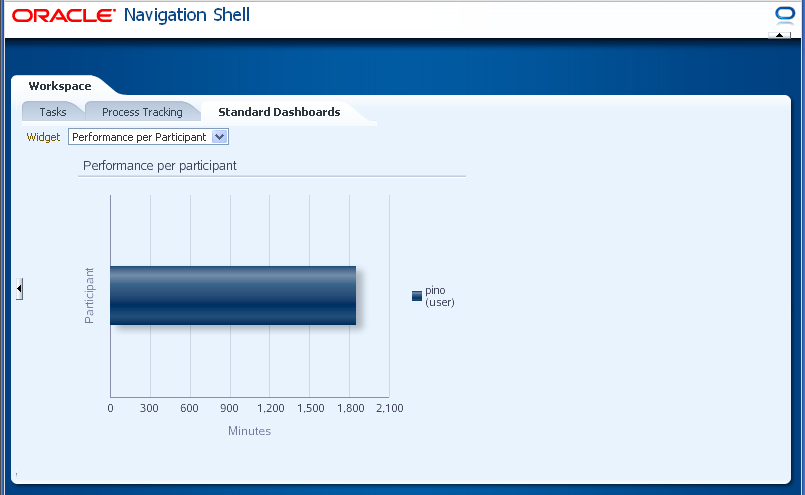
Figure 3: Workspace Standard Dashboards Tab


Artifacts

weblogic-application.xml
<?xml version = '1.0' encoding = 'windows-1252'?>
<weblogic-application xmlns:xsi="http://www.w3.org/2001/XMLSchema-instance"
                      xsi:schemaLocation="http://www.bea.com/ns/weblogic/weblogic-application http://www.bea.com/ns/weblogic/weblogic-application/1.0/weblogic-application.xsd"
                      xmlns="http://www.bea.com/ns/weblogic/weblogic-application">
  <listener>
    <listener-class>oracle.adf.share.weblogic.listeners.ADFApplicationLifecycleListener</listener-class>
  </listener>
  <listener>
    <listener-class>oracle.mds.lcm.weblogic.WLLifecycleListener</listener-class>
  </listener>
  <library-ref>
    <library-name>adf.oracle.domain</library-name>
  </library-ref>
  <library-ref>
    <library-name>oracle.soa.bpel</library-name>
  </library-ref>
  <library-ref>
    <library-name>oracle.soa.workflow</library-name>
  </library-ref>
  <library-ref>
    <library-name>oracle.bpm.runtime</library-name>
  </library-ref>
  <library-ref>
    <library-name>oracle.bpm.client</library-name>
  </library-ref>
  <library-ref>
    <library-name>oracle.bpm.projectlib</library-name>
  </library-ref>
  <library-ref>
    <library-name>oracle.bpm.workspace</library-name>
  </library-ref>
  <library-ref>
    <library-name>oracle.bpm.webapp.common</library-name>
  </library-ref>
</weblogic-application>


weblogic.xml
<?xml version = '1.0' encoding = 'windows-1252'?>
<weblogic-web-app xmlns="http://www.bea.com/ns/weblogic/weblogic-web-app">

  <security-role-assignment>
    <role-name>valid-users</role-name>
    <principal-name>users</principal-name>
  </security-role-assignment>
  <session-descriptor>
    <persistent-store-type>replicated_if_clustered</persistent-store-type>
  </session-descriptor>
  <library-ref>
    <library-name>oracle.soa.worklist.webapp</library-name>
    <specification-version>11.1.1</specification-version>
  </library-ref>
</weblogic-web-app>

taskListPageDef.xml
<?xml version="1.0" encoding="UTF-8" ?>
<pageDefinition xmlns="http://xmlns.oracle.com/adfm/uimodel"
                version="11.1.1.60.13" id="taskListPageDef"
                Package="fragments.workspace">
  <parameters/>
  <executables>
    <variableIterator id="variables"/>
    <taskFlow id="taskListtaskflowdefinition1"
              taskFlowId="/WEB-INF/taskList-task-flow-definition.xml#taskList-task-flow-definition"
              activation="deferred"
              xmlns="http://xmlns.oracle.com/adf/controller/binding">
      <parameters>
        <parameter id="taskFlowMode" value="workspace"/>
        <parameter id="showViewsPanel" value="true"/>
        <parameter id="showTaskDetailsPanel" value="true"/>
      </parameters>
    </taskFlow>
    <taskFlow id="processApplicationsTaskflow1"
              taskFlowId="/WEB-INF/processApplicationsTaskflow.xml#processApplicationsTaskflow"
              activation="deferred"
              xmlns="http://xmlns.oracle.com/adf/controller/binding"/>
  </executables>
  <bindings/>
</pageDefinition>

Sample Application

You can download the sample sample application from here.
To test the sample application after deployment, open in browser "http://host:port/myworkspace/faces/main".

Thursday, August 12, 2010

Loosely Coupled Bounded Task Flows + Outside-world Messenger

Chris Muir posted in ADF UI Patterns forum a thread entitled "Overcoming a challenge: combining UI Shell dirty tab + self-closing-BTFs". That post enforces my realization that there is something wrong with my current implementation of bounded task flows, in which we have so much dependency on the TabContext object of the UI Shell. This dependency made me unable to reuse the same task flow inside a stand-alone remote task flow (eg. ADF Task Flow from Human Task) that will be consumed by the Oracle SOA Suite BPM worklist app.
With that, I started reviewing my bounded task flows (BTFs)and succeeded in removing any dependency to the tabContext, while getting the same behavior. In short, my BTFs now do not have any defined "tabContext" input parameter.
Below are the tabContext specific actions that I have externalize:
  1. Setting the bounded task flow dirty (in which the UI Shell presents with an italicized tab title).
  2. Launching of new tabs from inside the bounded task flow.
  3. Closing of tabs from inside the bounded task flow.
  4. Postponing navigation to a return activity until a callback confirmation from the UI Shell dirty tab handler. (The challenge in Chris' post.)
Below are the important artifacts that I have incorporated.
  1. EventProducer.java - This class is exposed as a data control to work as a convenient event publisher. It has only one method "produceEvent()" that does nothing.
    public class EventProducer {
        public void produceEvent(){};
    }
    
  2. DynamicShellHelper.java - This class exposes the methods of TabContext as a data control. (I actually tried to expose the TabContext as data control but I'm not getting the right tabContext instance)
    package oracle.ui.pattern.dynamicShell;
    import java.util.Map;
    import soadev.ext.adf.taskflows.helper.Messenger;
    
    public class DynamicShellHelper {
          public void markCurrentTabDirty(TabContext tabContext, Boolean isDirty) {
              tabContext.markCurrentTabDirty(isDirty);
          }
    
          public void handleMessage(TabContext tabContext, Messenger messenger) {
              messenger.accept();
              tabContext.setMessenger(messenger);
              messenger.setRegion("pt_region" + tabContext.getSelectedTabIndex());
              System.out.println(messenger.getRegion());
              tabContext.showTabDirtyPopup();
          }
    
          public void launchActivity(TabContext tabContext, String title, String taskFlowId,
                                     Map<String, Object> parameterMap,
                                     boolean newTab) {
              try {
                  
                  if (newTab) { //allows multiple instance of taskflow.
    
                      tabContext.addTab(title, taskFlowId, parameterMap);
                  } else {
                      tabContext.addOrSelectTab(title, taskFlowId, parameterMap);
                  }
              } catch (TabContext.TabOverflowException toe) {
                  // causes a dialog to be displayed to the user saying that there are
                  // too many tabs open - the new tab will not be opened...
                  toe.handleDefault();
              }
          }
    }
    
  3. Messenger.java - This object is something that a bounded task flow can send to the outside world as a payload of a contextual event. If someObject somewhere accepted this payload object (invokes "accept()" method on the messenger instance), then the BTF put it's faith into that someObject, which the BTF doesn't know about, to invoke some affirmative or negative callback that will resolve the next navigation of the BTF. This class utilize the "Initiate Control Flow Within A Region From Its Parent Page Functional Pattern".
    package soadev.ext.adf.taskflows.helper;
    
    import javax.el.ELContext;
    import javax.el.ExpressionFactory;
    import javax.el.MethodExpression;
    import javax.faces.component.UIComponent;
    import javax.faces.context.FacesContext;
    import javax.faces.event.PhaseId;
    import oracle.adf.view.rich.component.rich.fragment.RichRegion;
    import soadev.view.utils.JSFUtils;
    
    public class Messenger {
    
        private boolean accepted = false;
        private String affirmativeOutcome;
        private String negativeOutcome;
        private String outcome;
        private String region;
    
        public void accept() {
            accepted = true;
        }
    
        public void affirmativeOutcomeCallback() {
            outcome = getAffirmativeOutcome();
            handleOuterPageAction();
        }
    
        public void negativeOutcomeCallback() {
            outcome=getNegativeOutcome();
            handleOuterPageAction();
        }
    
        public boolean isAccepted() {
            return accepted;
        }
    
        public void handleOuterPageAction() {
            UIComponent regionComponent = JSFUtils.findComponentInRoot(region);
            if (regionComponent instanceof RichRegion) {
                FacesContext fc = FacesContext.getCurrentInstance();
                ExpressionFactory ef = fc.getApplication().getExpressionFactory();
                ELContext elc = fc.getELContext();
                JSFUtils.setRequestAttribute("messenger", this);
                MethodExpression me =
                    ef.createMethodExpression(elc, "#{messenger.getOutcome}",
                                              String.class, new Class[] { });
                ((RichRegion)regionComponent).queueActionEventInRegion(me, null,
                                                                       null, false,
                                                                       -1, -1,
                                                                       PhaseId.ANY_PHASE);
            }
        }
    
        public void setAffirmativeOutcome(String affirmativeOutcome) {
            this.affirmativeOutcome = affirmativeOutcome;
        }
    
        public String getAffirmativeOutcome() {
            return affirmativeOutcome;
        }
    
        public void setNegativeOutcome(String negativeOutcome) {
            this.negativeOutcome = negativeOutcome;
        }
    
        public String getNegativeOutcome() {
            return negativeOutcome;
        }
    
        public void setRegion(String region) {
            this.region = region;
        }
    
        public String getRegion() {
            return region;
        }
    
        public void setOutcome(String outcome) {
            this.outcome = outcome;
        }
    
        public String getOutcome() {
            return outcome;
        }
    }
    
  4. TabContext.java - Below were the modification that I have made with regards to the TabContext class:
    • Added a Messenger attribute plus the getter and setter.
      private Messenger messenger;
      
    • Added a modified version of Chris Muir's RegionNavigationLister to support self-closing BTFs.
        public void myRegionNavigationListener(RegionNavigationEvent regionNavigationEvent) {
             String newViewId = regionNavigationEvent.getNewViewId();
             if (newViewId == null) {
                 //there is no turning back
                 //trans committed or rolledback already
                  _removeTab(getSelectedTabIndex(), true);
             }
        }
      
    • Modified the handleDirtyTabDialog() method to check if there is a messenger instance and invoke callback on the messenger accordingly. I believe that the patterns TabContext class should improve this method to allow the BTF to do appropriate rollback or commit before removing.
        public void handleDirtyTabDialog(DialogEvent ev){
          if (ev.getOutcome().equals(DialogEvent.Outcome.yes))
          {
              if(messenger != null){
                  messenger.affirmativeOutcomeCallback();
                  messenger = null;
              }else{//not initiated from inside the BTF
                  //do the regular way
                 _removeTab(getSelectedTabIndex(), true);
              }
          }else{
              if(messenger != null){
                  messenger.negativeOutcomeCallback();
                  messenger = null;
              }
          }
        }
      
  5. Programmatic raising of contextual events
    • In sending a messenger to the outside-world:
          public String cancel() throws Exception {
              Messenger messenger = new Messenger();
              messenger.setAffirmativeOutcome("rollback");
              fireEvent("produceEvent", messenger);
              if (messenger.isAccepted()) {
                  //stay on current page and wait for
                  //the knight in shining armor
                  return null;
              }
              //no one cares...
              return "rollback";
          }
      
    • In launching detail task flow on a separate tab from inside the BTF:
          public void jobSelected(ActionEvent event) {
              if (unbox((Boolean)getPageFlowScope().get("initiateLaunchActivityEvent"))){
                  Job job = (Job)getCurrentRowDataProvider("findAllJobsIterator");
                  Map payload = new HashMap();
                  payload.put("jobId", job.getJobId());
                  payload.put("taskFlowId",
                              getPageFlowScope().get("detailTaskFlowId"));
                  payload.put("title", "Job: " + job.getJobId());
                  fireEvent("produceEvent", payload);
              }
          }
      
    • Utility methods to fire contextual events.
          public EventProducer getEventProducer(String producer){
              BindingContainer bindings = getBindings();
              JUCtrlActionBinding actionBinding =
                  (JUCtrlActionBinding)bindings.getControlBinding(producer);
              return actionBinding.getEventProducer();
          }
      
          public void fireEvent(EventProducer eventProducer, Object payload) {
              BindingContainer bindings = getBindings();
              ((DCBindingContainer)bindings).getEventDispatcher().fireEvent(eventProducer, payload);
          }
      
          //more convenient
          public void fireEvent(String eventProducer, Object payload) {
              fireEvent(getEventProducer(eventProducer),payload);
          }
      
  6. dynamicTabShellDefinition.xml
    • Added methodActions from the DynamicShellHelper data control so they can become handlers of the event subscribers.
    • Defined the event map and event subscribers:
        <eventMap xmlns="http://xmlns.oracle.com/adfm/contextualEvent">
          <event name="transDirtyEvent">
            <producer region="*">
              <consumer handler="markCurrentTabDirty">
                <parameters>
                  <parameter name="tabContext" value="#{viewScope.tabContext}"/>
                  <parameter name="isDirty" value="#{payLoad}"/>
                </parameters>
              </consumer>
            </producer>
          </event>
          <event name="messageEvent">
            <producer region="*">
              <consumer handler="handleMessage">
                <parameters>
                  <parameter name="tabContext" value="#{viewScope.tabContext}"/>
                  <parameter name="messenger" value="#{payLoad}"/>
                </parameters>
              </consumer>
            </producer>
          </event>
          <event name="launchActivityEvent">
            <producer region="*">
              <consumer handler="launchActivity">
                <parameters>
                  <parameter name="tabContext" value="#{viewScope.tabContext}"/>
                  <parameter name="title" value="#{payLoad.title}"/>
                  <parameter name="taskFlowId" value="#{payLoad.taskFlowId}"/>
                  <parameter name="parameterMap" value="#{payLoad}"/>
                  <parameter name="newTab" value="true"/>
                </parameters>
              </consumer>
            </producer>
          </event>
        </eventMap>
      

Whew! This is a long post... I will describe the other artifacts and mechanism when my minds gets clear. For now you can download the sample application from here.


Continuation...

I guess the sample application is already enough to detail its mechanics so I leave this post as is.

In conclusion, I would like to thank Mr. Chris Muir for the encouragement and the exchange of ideas that we made through email related to this post.

Cheers!

Thursday, July 29, 2010

ADF UI Shell: Updating Title of the Current Tab

Sometimes you may wish to update the current tab title after some actions like saving a new record. You can do so through the following code inside your backing bean:
    public void updateCurrentTabTitle(String title) {
        TabContext tabContext = TabContext.getCurrentInstance();
        int currentTabIndex = tabContext.getSelectedTabIndex();
        Tab tab = tabContext.getTabs().get(currentTabIndex);
        tab.setTitle(title);
        //force refresh
        tabContext.setSelectedTabIndex(currentTabIndex);
    }
Be sure that you have defined a "tabContext" input parameter in your task flow definition so you can access the TabContext object.

Friday, March 19, 2010

ADF UI Shell: Extending the UI Shell to Allow Passing of Parameters to Bounded Task Flows

I am trying to create a blog-post demonstrating a pattern of having a list, show details, edit, and create activities based on the HR Schema. But upon testing, I was stacked on the issue of parameter passing to bounded task flows of the UI Shell which was discussed on this thread. Since in the previous post, I had just demonstrated how to make minor modification to the layout of the Dynamic Tab Shell template, so I thought that it would be better to consolidate the information and post here the step-by-step guide on how to support parameter passing while the fix is not yet available.

To allow parameter passing to the bounded task flows that will be launched on a separated tab, we need to modify the dynamicTabShellDefinition.xml file in the oracle-page-templates-ext.jar. Below is the step by step procedure to do this:
  1. Copy the oracle-page-templates-ext.jar from %MiddlewareHome%\jdeveloper\adfv\jlib\ folder
  2. Create a new folder in drive C like C:\temp and paste the copied jar.
  3. Extract the contents of the jar.
    1. Open command prompt and navigate to the C:\temp folder.
    2. Enter the following command:
      jar xf oracle-page-templates-ext.jar
          
    3. If the jar command cannot be recognized, then you need to add the java bin folder path into the "Path" system variables. Ex. "C:\Oracle\Middleware\jdk160_14_R27.6.5-32\bin;"
  4. Delete the jar that we have copied into the temp directory. We do this so that we can easily repack a jar later.
  5. In windows explorer, browse the "dynamicTabShellDefinition.xml" file in "C:\temp\oracle\ui\pattern\dynamicShell\model" directory
  6. Right click the file and click "open with...". Open it with JDeveloper.
  7. Modify the parameter definition to as follows:
    <parameters>
        <parameter id="tabContext" value="${viewScope.tabContext}"/>
        <parameter id="parameterMap" value="${requestScope.parameterMap}"/>
    </parameters>
    
  8. Redefine all the taskFlow/region bindings to define the "parametersMap" attribute value to "#{bindings.parameterMap}".
    <taskFlow id="r0"
                  taskFlowId="${viewScope.tabContext.taskflowIds[0]}"
                  activation="deferred"
                  xmlns="http://xmlns.oracle.com/adf/controller/binding"
                  parametersMap="#{bindings.parameterMap}">
          <parameters>
            <parameter id="tabContext" value="${bindings.tabContext}"
                       xmlns="http://xmlns.oracle.com/adfm/uimodel"/>
          </parameters>
    </taskFlow>
    
    You need to do this to all the 15 region definition.
  9. Save your modification.
  10. Repackage the file in a jar. Open a command prompt navigate to the temp folder we created earlier then run the following command:
    jar cfM0 oracle-page-templates.jar *
    
    0 (Zero)
    You can give the jar a different name if you like.
  11. Modify libraries and classpath.
    1. Open your application in JDeveloper.
    2. Right-click your ViewController project and click project properties.
    3. Remove the Oracle Extended Page Templates in the classpath entries.
    4. Add the jar file that we created in the step above.

If you wanted to see a sample test case using the ADF UI Shell that connects to HR Schema, see the following post:
UI Shell in Action

Cheers!

Wednesday, March 17, 2010

ADF UI Shell: Customizing the Dynamic Tab Shell Layout

A user in Oracle UI Shell Functional Pattern thread asked me on a step by step guide on how to re-size the space taken by the Legal area at the bottom part of the UI Shell, thus I came up with this post.


If you wanted to modify some layout of the Oracle Dynamic Tabs template, you can do the following:
  1. Copy the oracle-page-templates-ext.jar from %MiddlewareHome%\jdeveloper\adfv\jlib\ folder
  2. Create a new folder in drive C like C:\temp and paste the copied jar.
  3. Extract the contents of the jar.
    1. Open command prompt and navigate to the C:\temp folder.
    2. Enter the following command:
      jar xf oracle-page-templates-ext.jar
          
    3. If the jar command cannot be recognized, then you need to add the java bin folder path into the "Path" system variables. Ex. "C:\Oracle\Middleware\jdk160_14_R27.6.5-32\bin;"
  4. Delete the jar that we have copied into the temp directory. We do this so that we can easily repack a jar later.
  5. In windows explorer, browse the "dynamicTabShell.jspx" file in "C:\temp\oracle\ui\pattern\dynamicShell" directory
  6. Right click the file and click "open with...". Open it with JDeveloper.
  7. Modify the bottom height of the panelStretchLayout component highlighted in the following screen shot. Modify the size from the default "50px" to the value you desired like for example "15px".
    The effect of your modification can be immediately noticed on the design view of the page.
  8. Save your modification.
  9. Repackage the file in a jar. Open a command prompt navigate to the temp folder we created earlier then run the following command:
    jar cfM0 oracle-page-templates.jar *
    
    0 (Zero)
    You can give the jar a different name if you like.
  10. Modify libraries and classpath.
    1. Open your application in JDeveloper.
    2. Right-click your ViewController project and click project properties.
    3. Remove the Oracle Extended Page Templates in the classpath entries.
    4. Add the jar file that we created in the step above.
  11. Run your application. In my case I applied it to the accompanying UIShellSherman_v02 sample app of the UI Shell.

For more information about unpacking and packaging jar files, see the following links:
If you wanted to extend the UI Shell to allow passing of parameters to the bounded task flows, click here.

Cheers!

Friday, March 12, 2010

ADF Faces RC: Grab that ADF Skins in 5 minutes

In this post, I applied skinning to the accompanying demo application (UIShellSherman_V02)of the ADF UI Shell to demonstrate how easy it is to apply skinning into an existing ADF application . You can do the same into your current application in just a matter of 5 minutes by following this blogpost. Impress your boss now! :D
Oracle ADF Faces RC has the following skins which could jump-start implementation of skinning into your application:
  • fusion

  • rainforest

  • sporty

  • princess

  • blafplus-rich
  • blafplus-medium
  • fusion projector
  • simple

Before you start the steps below, be sure that you have an extracted copy of the latest adffacesdemo. You can download the same here.

The time starts now...

To apply skinning into your app, do the following:
  1. Copy the skins folder of adffacesdemo.
  2. Copy the trinidad-skins.xml of the adffacesdemo
  3. Add additional "skinFamily" string attribute into your existing session scope managed bean that holds user session information.
  4. Add a skin menu into your menu bar.

Copy the skins folder of adffacesdemo

Copy the skins folder of adffacesdemo located in .../adffacesdemo/public_html and paste it into the public_html directory of your application.

Copy the trinidad-skins.xml of the adffacesdemo

Copy the trinidad-skins.xml of the adffacesdemo located in .../adffacesdemo/public_html/WEB_INF folder and paste the same on the same directory in your application

Add additional "skinFamily" string attribute into your existing session scope managed bean

You can add the "skinFamily" string attribute into an existing session scope manage bean that holds user session information. If nothing is applicable, you can create something like the following class and declare it as a session scope managed bean in adfc-config.xml
package soadev.view.managed;

import java.io.IOException;
import javax.faces.context.ExternalContext;
import javax.faces.context.FacesContext;
import javax.faces.event.ActionEvent;
import oracle.adf.view.rich.component.rich.nav.RichCommandMenuItem;

public class UserSession {
    private String skinFamily;

    public void setSkinFamily(String skinFamily) {
        this.skinFamily = skinFamily;
        reloadThePage();
    }

    public String getSkinFamily() {
        if (skinFamily == null) {
            skinFamily = "fusion";
        }
        return skinFamily;
    }

    public void skinMenuAction(ActionEvent event) {
        RichCommandMenuItem menuItem = (RichCommandMenuItem)event.getComponent();
        setSkinFamily(menuItem.getText());
        reloadThePage();
    }
    
    //taken from adffacesdemo
    public static void reloadThePage() {
        FacesContext fContext = FacesContext.getCurrentInstance();
        String viewId = fContext.getViewRoot().getViewId();
        String actionUrl =
            fContext.getApplication().getViewHandler().getActionURL(fContext,
                                                                    viewId);
        try {
            ExternalContext eContext = fContext.getExternalContext();
            String resourceUrl =
                actionUrl; //eContext.encodeResourceURL(actionUrl);
            // Use the action URL directly since the encoding a resource URL will NPE in isEmailablePage()
            eContext.redirect(resourceUrl);
        } catch (IOException ioe) {
            System.err.println("Problem trying to reload the page:");
            ioe.printStackTrace();
        }
    }  
}

Add a skin menu into your menu bar

Add a skin menu into your existing menu bar plus menuCommandItems for the skins to be supported. Below is a sample menuBar with a skin menu:
    <af:menuBar id="menuBar" styleClass="AFHideSidePadding">
      <af:menu text="Skin" id="ptm1">
        <af:commandMenuItem text="blafplus-rich" type="radio"
                            actionListener="#{userSession.skinMenuAction}"
                            selected="#{userSession.skinFamily=='blafplus-rich'}"
                            id="ptcmi1"/>
        <af:commandMenuItem text="blafplus-medium" type="radio"
                            actionListener="#{userSession.skinMenuAction}"
                            selected="#{userSession.skinFamily=='blafplus-medium'}"
                            id="ptcmi2"/>
        <af:commandMenuItem text="fusion" type="radio"
                            actionListener="#{userSession.skinMenuAction}"
                            selected="#{userSession.skinFamily=='fusion'}"
                            id="ptcmi31"/>
        <af:commandMenuItem text="fusion-projector" type="radio"
                            actionListener="#{userSession.skinMenuAction}"
                            selected="#{userSession.skinFamily=='fusion-projector'}"
                            id="ptcmi31_1"/>
        <af:commandMenuItem text="simple" type="radio"
                            actionListener="#{userSession.skinMenuAction}"
                            selected="#{userSession.skinFamily=='simple'}"
                            id="ptcmi4"/>
        <af:commandMenuItem text="rainforest" type="radio"
                            actionListener="#{userSession.skinMenuAction}"
                            selected="#{userSession.skinFamily=='rainforest'}"
                            id="ptcmi6"/>
        <af:commandMenuItem text="sporty" type="radio"
                            actionListener="#{userSession.skinMenuAction}"
                            selected="#{userSession.skinFamily=='sporty'}"
                            id="ptcmi7"/>
        <af:commandMenuItem text="princess" type="radio"
                            actionListener="#{userSession.skinMenuAction}"
                            selected="#{userSession.skinFamily=='princess'}"
                            id="ptcmi8"/>
      </af:menu>
    </af:menuBar>
Your done? Congratulations! :D

How did I apply it to the accompanying app (UIShellSherman_V02)?

  • I created a global_links.jspx with the following code:
    <?xml version='1.0' encoding='UTF-8'?>
    <jsp:root xmlns:jsp="http://java.sun.com/JSP/Page" version="2.1"
              xmlns:f="http://java.sun.com/jsf/core"
              xmlns:h="http://java.sun.com/jsf/html"
              xmlns:af="http://xmlns.oracle.com/adf/faces/rich"
              xmlns:trh="http://myfaces.apache.org/trinidad/html">
      <jsp:directive.page contentType="text/html;charset=UTF-8"/>
      <af:panelGroupLayout id="pgl1">
        <af:menuBar id="menuBar" styleClass="AFHideSidePadding">
          <af:menu text="Skin" id="ptm1">
            <af:commandMenuItem text="blafplus-rich" type="radio"
                                actionListener="#{userSession.skinMenuAction}"
                                selected="#{userSession.skinFamily=='blafplus-rich'}"
                                id="ptcmi1"/>
            <af:commandMenuItem text="blafplus-medium" type="radio"
                                actionListener="#{userSession.skinMenuAction}"
                                selected="#{userSession.skinFamily=='blafplus-medium'}"
                                id="ptcmi2"/>
            <af:commandMenuItem text="fusion" type="radio"
                                actionListener="#{userSession.skinMenuAction}"
                                selected="#{userSession.skinFamily=='fusion'}"
                                id="ptcmi31"/>
            <af:commandMenuItem text="fusion-projector" type="radio"
                                actionListener="#{userSession.skinMenuAction}"
                                selected="#{userSession.skinFamily=='fusion-projector'}"
                                id="ptcmi31_1"/>
            <af:commandMenuItem text="simple" type="radio"
                                actionListener="#{userSession.skinMenuAction}"
                                selected="#{userSession.skinFamily=='simple'}"
                                id="ptcmi4"/>
            <af:commandMenuItem text="rainforest" type="radio"
                                actionListener="#{userSession.skinMenuAction}"
                                selected="#{userSession.skinFamily=='rainforest'}"
                                id="ptcmi6"/>
            <af:commandMenuItem text="sporty" type="radio"
                                actionListener="#{userSession.skinMenuAction}"
                                selected="#{userSession.skinFamily=='sporty'}"
                                id="ptcmi7"/>
            <af:commandMenuItem text="princess" type="radio"
                                actionListener="#{userSession.skinMenuAction}"
                                selected="#{userSession.skinFamily=='princess'}"
                                id="ptcmi8"/>
          </af:menu>
        </af:menuBar>
      </af:panelGroupLayout>
    </jsp:root>
    

  • I added a <jsp:include> tag to the globalLinks facet of the pages that implement the ADF UI Shell template. Below is a code snippet:
    <f:facet name="globalLinks">
      <f:subview id="sv1">
        <jsp:include page="/global_links.jspx" flush="true"/>
      </f:subview>
    </f:facet>
    

Conclusion

In this post we learn the following "how tos":
  • How to easily apply skinning into an existing ADF Faces RC application.
  • How to reload a page programmatically.
  • How to use <jsp:include> tag in ADF pages.
Cheers!

Wednesday, February 24, 2010

ADF Faces RC: Building a Reusable Google Map Viewer that Supports both Geocoding and Reverse Geocoding (Applying Frank Nimphius' Declarative Lightweight Popup)

In this post, I will show you how to build a reusable Google Map Viewer that supports both Geocoding and Reverse Geocoding. This map viewer is implemented based on Frank Nimphius' declarative lightweight popup pattern. This can be incorporated from anywhere in your application that has address information.

Our steps to recreate this would be as follows:
  1. Sign up for the Google Maps API
  2. Create a new Task Flow named "google-map-viewer-task-flow" with a single view and a task-flow-return activity.
  3. Define task-flow input and return parameters
  4. Create and design the google_map.jspx
  5. Copy my javascript code
  6. Create the GoogleMapViewerForm (the backing bean of google_map.jspx)
  7. Integrate the google-map-viewer-task-flow as a task-flow-call activity into your existing task flows

Sign up for the Google Maps API

Go to the following site: http://code.google.com/apis/maps/signup.html and secure an API Key. A single Maps API key is valid for a single directory or domain. If you are testing your app using http://localhost:7101 or http://127.0.0.1:7101, then you should input that in the "My web site URL" textbox when generating the key. You must have a Google Account to get a Maps API key, and your API key will be connected to your Google Account. Keep the API Key for later use.

Create a new Task Flow named "google-map-viewer-task-flow" with a single view and a task-flow-return activity

Create the task flow with a single view named "google_map", a task-flow-return named "exit", and a control-flow-case named "return" as depicted below:

Define taskflow input and return parameters

Below are the optional input parameters and there definitions:
  • address - if a valid latitude or longitude parameter is not available, the map viewer will try to geocode the address;
  • latitude - both latitude and longitude should be provided so that the map viewer will process the coordinates and center it on map, otherwise the map viewer will just geocode for the address;
  • longitude - same as latitude info above;
  • countryCode - to prefer results to this country (but not to restrict the results); stated as a two-letter ISO compliant code;
Below are the defined output parameters which could return null values if no point was clicked on the map for reverse geocoding:
  • returnAddress - reverse geocode resulting address;
  • returnLatitude - selected point latitude;
  • returnLongitude - selected point longitude, selected coordinates are mark with an arrow marker;
  • returnDetails - if a point was selected in the map for reverse geocoding, the selected coordinates and the resulting details (all information from the client including the address above) will be returned here, otherwise null;

Create and design the google_map.jspx

Double click the google_map view in the task flow to invoke the "create page" wizard. You could put the page under ".../public_html/pages". Basically here are the items that we need to put on our page:
  • a clientListener that upon page load invokes the initialize javascript which inturn call a serverListener;
  • a serverListener mentioned above that invokes a server side code;
  • a <af:resource> component that will import our external javascript;
  • a panelHeader where the map will be placed;
  • an inputTextBox to input address to search.
  • a button to invoke search;
  • a button to return to the calling task-flow;
<?xml version="1.0" encoding="UTF-8"?>
<jsp:root xmlns:jsp="http://java.sun.com/JSP/Page" version="2.1"
          xmlns:f="http://java.sun.com/jsf/core"
          xmlns:h="http://java.sun.com/jsf/html"
          xmlns:af="http://xmlns.oracle.com/adf/faces/rich"
          xmlns:v="urn:schemas-microsoft-com:vml">
  <jsp:directive.page contentType="text/html;charset=UTF-8"/>
  <f:view>
    <af:document id="d1" clientComponent="true">
        <af:clientListener method="initialize" type="load" />
        <af:serverListener type="loadGoogleMap"
                           method="#{backingBeanScope.googleMapViewer.loadGoogleMap}" />
        <af:serverListener type="submitInfoToServer"
                           method="#{backingBeanScope.googleMapViewer.setReturnValues}" />
      
      <af:form id="f1" defaultCommand="cb1">
       
        <af:panelStretchLayout id="psl1" topHeight="auto">
          <f:facet name="center">
            <af:panelHeader id="mapPH" text=" "
                            inlineStyle="width:700PX; height: 400px">
              <f:facet name="toolbar"/>
            </af:panelHeader>
          </f:facet>
          <f:facet name="top">
            <af:panelBorderLayout id="pbl1">
              <f:facet name="start">
                <af:panelGroupLayout id="pgl2" layout="horizontal">
                  <af:inputText id="searchField" clientComponent="true"
                                columns="100"/>
                  <af:commandButton id="cb1" text="Search"
                                    clientComponent="true" partialSubmit="true">
                    <af:clientListener type="click" method="goFindAddress"/>
                  </af:commandButton>
                </af:panelGroupLayout>
              </f:facet>
              <f:facet name="end">
                <af:panelGroupLayout id="pgl1">
                  <af:commandButton text="Return" id="cb2" action="return"/>
                </af:panelGroupLayout>
              </f:facet>
            </af:panelBorderLayout>
          </f:facet>
        </af:panelStretchLayout>
      </af:form>
      <f:facet name="metaContainer">
        <af:group>
          <af:resource type="javascript" source="http://www.google.com/jsapi?key=YOUR_KEY_FROM_STEP_1"></af:resource>      
           <af:resource type="javascript">
    google.load("maps", "2.x");
   </af:resource>
   <af:resource type="javascript" source="/js/google_map_viewer.js"/>
   <af:resource type="javascript">
          window.onunload = GUnload;
          </af:resource>      
         </af:group>
      </f:facet>
    </af:document>
  </f:view>
</jsp:root>
Find the snippet below in the above code and replace the key with the key you generated in step 1:
<af:resource type="javascript" source="http://www.google.com/jsapi?key=YOUR_KEY_FROM_STEP_1"></af:resource>   

Copy my javascript code

This the bonus part. You'll just have to copy my code below for now and understand it later. Put the google_map_viewer.js under ".../public_html/js" folder.
/**http://soadev.blogspot.com/
*/

var map;
var geocoder;
var orig_coordinates;
var orig_marker;

function initialize(event) {
    var source = event.getSource();
    AdfCustomEvent.queue(source, "loadGoogleMap", 
    {
    },
false);
}

function initializeMap(clientId, latitude, longitude, address, countryCode) {
    if (GBrowserIsCompatible()) {
        map = new google.maps.Map2(document.getElementById(clientId));
        map.addControl(new GLargeMapControl());
        map.addControl(new GMapTypeControl());
        GEvent.addListener(map, 'click', getAddress);
        geocoder = new GClientGeocoder();
        //tailor to a particular domain (country)     
        if (countryCode) {
            geocoder.setBaseCountryCode(countryCode);
        }
        if (latitude != null && longitude != null) {
            //valid coordinates
            //set center of map to the coordinates and add a marker 
            orig_coordinates = new GLatLng(latitude, longitude);
            map.setCenter(orig_coordinates, 15);
            orig_marker = new GMarker(orig_coordinates);
            map.addOverlay(orig_marker);
            var info = "Original Coordinates: " + latitude + "," + longitude;
            addClickListener(orig_marker, info);
        }
        else {
            //none valid coordinates so try to find the address instead
            if (address != null) {
                findAddress(address);
            }
            else {
                //address is null so set center to default
                map.setCenter(new GLatLng(0, 0), 1);
            }
        }
    }
}

function getAddress(overlay, latlng) {
    //if far enough return
    if (map.getZoom() < 14) {
        return;
    }
    if (latlng != null) {
        var icon = createArrowIcon();
        arrow_marker = new GMarker(latlng, 
        {
            icon : icon
        });
        map.clearOverlays();
        map.addOverlay(arrow_marker);
        addClickListener(arrow_marker, latlng.toUrlValue());
        if (orig_marker) {
            map.addOverlay(orig_marker);
            var info = "Original Coordinates: " + orig_coordinates.toUrlValue();
            addClickListener(orig_marker, info);
        }
        //Reverse GeoCode
        geocoder.getLocations(latlng, showAddress);
    }
}

function createArrowIcon() {
    var icon = new GIcon();
    var url = "http://maps.google.com/mapfiles/";
    icon.image = url + "arrow.png";
    icon.shadow = url + "arrowshadow.png";
    icon.iconSize = new GSize(39, 34);
    icon.shadowSize = new GSize(39, 34);
    icon.iconAnchor = new GPoint(20, 34);
    icon.infoWindowAnchor = new GPoint(20, 0);
    return icon;
}

function showAddress(response) {
    if (!response || response.Status.code != 200) {
        alert("Status Code:" + response.Status.code);
    }
    else {
        submitInfoToServer(response);
        place = response.Placemark[0];
        plotPlace(place);
    }
}

function goFindAddress(event) {
    var searchField = event.getSource().findComponent("searchField");
    var input = searchField.getValue();
    findAddress(input);
    event.cancel();
}

function findAddress(input) {
    var address = input;
    //GeoCode
    if (geocoder) {
        geocoder.getLocations(input, function (response) {
            if (!response || response.Status.code != 200) {
                var index = address.indexOf(",");
                if (index ==  - 1) {
                    processPointNotFound();
                    return;
                }
                //simplify address by removing the details separated by comma
                address = address.substring(index + 1);
                //recurse until a point is found
                findAddress(address);
            }
            else {
                place = response.Placemark[0];
                plotPlace(place);
            }
        });
    }
}

function processPointNotFound() {
    alert("address not found");
    map.setCenter(new GLatlng(0, 0), 1);
}

function plotPlace(place) {
    var point = new GLatLng(place.Point.coordinates[1], place.Point.coordinates[0]);
    var marker = new GMarker(point);
    map.addOverlay(marker);
    map.setCenter(point, 14);
    var info = "<b>Result Coordinates:</b>" + point.toUrlValue() + "<br/>" + "<b>Address:</b>" + place.address + "<br/>" + "<b>Accuracy:</b>" + place.AddressDetails.Accuracy + "<br/>" + "<b>Country code:</b> " + place.AddressDetails.Country.CountryNameCode;
    addClickListener(marker, info);

}

function addClickListener(marker, info) {
    GEvent.addListener(marker, "click", function () {
        marker.openInfoWindowHtml(info);
    });
    marker.openInfoWindowHtml(info);
}

function submitInfoToServer(response) {
    var place = response.Placemark[0];
    var result_point = new GLatLng(place.Point.coordinates[1], place.Point.coordinates[0]);
    var address = place.address;
    var addressDetails = place.AddressDetails;
    var accuracy = addressDetails.Accuracy;
    var country = addressDetails.Country;
    var countryNameCode = country.CountryNameCode;
    var adminArea = country.AdministrativeArea;
    var adminAreaName;
    var locality;
    var localityName;
    var thoroughfare;
    var postalCode;
    if (adminArea != null) {
        adminAreaName = adminArea.AdministrativeAreaName;
        locality = adminArea.Locality;
        if (locality != null) {
            localityName = locality.LocalityName;
            thoroughfare = locality.Thoroughfare;
            postalCode = locality.PostalCode;
            if (thoroughfare != null) {
                thoroughfare = thoroughfare.ThoroughfareName;
            }
            if (postalCode != null) {
                postalCode = postalCode.PostalCodeNumber;
            }
        }
    }
    var source = AdfPage.PAGE.findComponent("d1");
    AdfCustomEvent.queue(source, "submitInfoToServer", 
    {
        selected_point : response.name, result_point:result_point , address : address, country : countryNameCode, area : adminAreaName, locality : localityName, thoroughfare : thoroughfare, postalCode : postalCode, accuracy : accuracy
    },
false);
}

Create the GoogleMapViewerForm (the backing bean of google_map.jspx)

Create a new class GoogleMapViewerForm and add a "googleMapViewer" managed bean with backingBean scope in google-map-viewer-task-flow.
package blogspot.soadev.view.backing;

import java.util.Map;
import javax.faces.context.FacesContext;
import oracle.adf.view.rich.context.AdfFacesContext;
import oracle.adf.view.rich.render.ClientEvent;
import org.apache.myfaces.trinidad.render.ExtendedRenderKitService;
import org.apache.myfaces.trinidad.util.Service;

/**@author pino
 */
public class GoogleMapViewerForm {

    public void loadGoogleMap(ClientEvent clientEvent){
        FacesContext context = FacesContext.getCurrentInstance();
        Map<String, Object> pageFlowScope = AdfFacesContext.getCurrentInstance().getPageFlowScope();
        Object obj = null;
        String address = null;
        String countryCode = null;
        Double latitude = null;
        Double longitude = null;
        
        address = (String)pageFlowScope.get("address");
        countryCode = (String) pageFlowScope.get("countryCode");
        obj = pageFlowScope.get("latitude");
        if (obj != null && obj instanceof Double){
            latitude = (Double)obj;
        }
        obj = pageFlowScope.get("longitude");
        if (obj != null && obj instanceof Double){
            longitude = (Double)obj;
        }
        //build javascript
        StringBuilder script = new StringBuilder();
        script
            .append("initializeMap(")
            .append("'mapPH',")
            .append(latitude)
            .append(",")
            .append(longitude)
            .append(",'")
            .append(address)
            .append("','")
            .append(countryCode)
            .append("');");
       
        ExtendedRenderKitService erks = 
            Service.getService(context.getRenderKit(), ExtendedRenderKitService.class);
          erks.addScript(context, script.toString());
    }

   public void setReturnValues(ClientEvent event) {
        Map<String, Object> pageFlowScope =AdfFacesContext.getCurrentInstance().getPageFlowScope();
        Map<String, Object> eventParams = event.getParameters();
        Object selectedCoordinates = eventParams.get("selected_point");
        if (selectedCoordinates != null){
            String coordinates[] = ((String)selectedCoordinates).split(",");
            Double latitude = Double.parseDouble(coordinates[0]);
            Double longitude = Double.parseDouble(coordinates[1]);
            pageFlowScope.put("returnLatitude", latitude);
            pageFlowScope.put("returnLongitude", longitude);
        }
        pageFlowScope.put("returnAddress", eventParams.get("address"));
        pageFlowScope.put("returnDetails", eventParams);
    }
}

Integrate the google-map-viewer-task-flow as a task-flow-call activity into your existing task flows

Steps to integrate the Google Map viewer into your application:
  1. Open your existing task flow in diagram view and drag a task-flow-call activity from the component pallete.
  2. Drag the google-map-viewer-task-flow from the project explorer into the task-flow-call activity created above.
  3. Add a control-flow-case and extend it from one of your page that has address information to our google-map-viewer-task-flow activity.
  4. Add a button on your page that will have an
A picture paints a thousand words. Please see screen shot below:
Screen shot of the sample page that invokes the map viewer:
The action listener is bound to the class SamplePageForm declared as "samplePage" managed bean with backingBean scope. Below is the illustrative code:
package soadev.blogspot.view.backing;

import java.util.Iterator;
import java.util.Map;
import javax.faces.event.ActionEvent;
import oracle.adf.view.rich.context.AdfFacesContext;
import org.apache.myfaces.trinidad.event.ReturnEvent;

public class SamplePageForm {
    public void setMapInputParams(ActionEvent event) {
        Map pageFlowScope = AdfFacesContext.getCurrentInstance().getPageFlowScope();
        //You will get the information to put to the pageFlowScope below
        //from your iterator binding objects. 
        //sample inputs only, replace Jeddah
        pageFlowScope.put("address", "Jeddah");
        //replace null with your own data;
        pageFlowScope.put("latitude", null);
        pageFlowScope.put("longitude", null);
        pageFlowScope.put("countryCode", null);
        
    }

    public void handleMapDialogReturn(ReturnEvent event) {
        System.out.println("handling dialog return...");
        Map eventReturnParams = event.getReturnParameters();
        Iterator iterator = eventReturnParams.entrySet().iterator();
        while (iterator.hasNext()) {
            Map.Entry entry = (Map.Entry)iterator.next();
            Object key = entry.getKey();
            Object value = entry.getValue();
            System.out.println(key + " ..... " + value);
        }
        Object obj = null;
        Double latitude = null;
        Double longitude = null;
        obj = eventReturnParams.get("latitude");
        if (obj != null && obj instanceof Double) {
            latitude = (Double)obj;
        }
        obj = eventReturnParams.get("longitude");
        if (obj != null && obj instanceof Double) {
            longitude = (Double)obj;
        }
        if (latitude != null && longitude != null) {
            //TODO create popup confirmation to apply new selected coordinates
            //showDialog(popup);
        }
    }
}
Below is a sample result of the handleMapDialogReturn() method above:
handling dialog return...
returnDetails ..... {postalCode=null, area=null, address=7901 Hail, Jeddah 23325, Saudi Arabia, locality=null, thoroughfare=null, selected_point=21.540356,39.160337, accuracy=8.0, country=SA, result_point={of=21.5404074, y=21.5404074, x=39.1601585, $a=39.1601585}}
returnLatitude ..... 21.540356
returnAddress ..... 7901 Hail, Jeddah 23325, Saudi Arabia
returnLongitude ..... 39.160337

Summary

This blogpost illustrate the following "How Tos":
  • How to integrate the Google Maps API to an Oracle ADF application.
  • How to run a backing bean code upon page load.
  • How to pass parameters from the server to the client and vice-versa.
  • How to do geocoding and reverse geocoding in Google Maps.
  • How to apply Frank Nimphius declarative lightweight popup pattern.

Related Posts

This post is long one (and it sure made me exhausted). I hope that you learn something from here.

Cheers!

Thursday, February 18, 2010

ADF UI Shell: Automatically Open a Default Activity Upon Page Load

I am watching the Oracle UI Shell Functional Pattern thread at OTN and noted that some people were interested on how to automatically open a default activity in ADF UI Shell. I decided to take up the challenge and came up with the following.

This post is just a demonstration on how to open a default activity upon page load in ADF UI Shell, based on the accompanying sample application named "UISHellSherman_V02".
Let us simulate the concept using the page First.jspx.
  1. Add the Trinidad HTML Components 1.2 JSP Tag Library on the uiShellViewController project
  2. Open First.jspx and add the Trinidad "trh" tag declaration on the jsp root. The jsp root declaration should look like the following:
    <?xml version='1.0' encoding='UTF-8'?>
    <jsp:root xmlns:jsp="http://java.sun.com/JSP/Page" version="2.1"
              xmlns:f="http://java.sun.com/jsf/core"
              xmlns:h="http://java.sun.com/jsf/html"
              xmlns:af="http://xmlns.oracle.com/adf/faces/rich"
              xmlns:trh="http://myfaces.apache.org/trinidad/html">
    
  3. Add the following client and server listeners:
    <af:document id="d1" title="First Page">
          <af:clientListener method="initialize" type="load" />
            <af:serverListener type="launchDefaultActivity"
                               method="#{backingBeanScope.launcher.launchDefaultActivity}" />
    

  4. Right-click the line <af:document id="d1" title="First Page"> click Facets -document, then enable the Meta Container facet.
    Modify the Meta Container facet to reflect the following:
    <f:facet name="metaContainer">
            <af:group>
             <trh:script>
                function initialize(event) {
                    var source = event.getSource();
                    AdfCustomEvent.queue(source,"launchDefaultActivity",{},false);
                }
              </trh:script>
            </af:group>
          </f:facet>
    
  5. Add a launchDefaultActivity() method on the Launcher class.
    public void launchDefaultActivity(ClientEvent clientEvent) {
            _launchActivity(
              "The Default Activity",
              "/WEB-INF/flows/first.xml#first",
              false);
        }
    
  6. Run the First.jspx

Related Posts


Cheers!

Sunday, February 14, 2010

ADF UI Shell: Dynamic Tree Menu based on User Roles (ADF Policies)

In this post, I will try to share with you how to create a dynamic tree menu based on the authorization defined in ADF Policies (jazn.xml) in an application built with ADF UI Shell. Menu Items will be added to the tree menu, if the user has a role that was granted view authorization on a certain task-flow or page.


To accomplish the creation of a dynamic menu based on user roles, we need to do at least the following:
  1. Create and populate a Menu Table in the database;
  2. Generate a Menu entity thru the "Entities from Table" wizard in JDeveloper;
  3. Create a session bean to act as facade of our entity;
  4. Create a managed bean to provide tree model of authorized menus in appropriate hierarchy;
  5. Create a .jspx page based on the Oracle Dynamic Tabs Shell Template.
  6. Create a Launcher backing bean that will support our page and provide method to launch new tabs.
  7. Grant view authorization to our taskflows defined in jazn.xml to certain roles.

1) Create and populate a Menu Table in the database;

To support a dynamic menu based on roles we only need to have a table of menu items. A table of roles is not necessary. The key to the solution is the java version of the "#{securityContext.taskFlowViewable['taskFlowId']}" EL expression. Below is the diagram of our table:
ColumnComments
MENU_ID Primary key
DESCRIPTIONThe label that will be displayed on the tree.
DEFINITIONThis will hold taskFlowIds like for example "/WEB-INF/taskflows/gl/natural-acct-list-task-flow.xml#natural-acct-list-task-flow".
PARENT_MENU_IDThe id of the containing menu. This table is recursive.
TYPEThis field will enable us to show different icons per type.
DISPLAY_SEQThe sorting or display sequence of the menus.
IS_MULTIPLE_INSTANCERepresents a boolean value to determine if multiple instance of this taskflow will be allowed on UI Shell tabs.

2) Generate a Menu entity thru the "Entities from Table" wizard in JDeveloper;

Below is a sample generated Menu Entity class (please note the annotations are on the properties instead of the fields - I encountered strange error in related to jpa sessions ("this session is not of the current object but of the parent blah blah...")when I attempted to put the annotations in the fields ).
package blogspot.soadev.model;

import java.io.Serializable;
import java.util.Collections;
import java.util.List;
import javax.persistence.Column;
import javax.persistence.Entity;
import javax.persistence.Id;
import javax.persistence.JoinColumn;
import javax.persistence.ManyToOne;
import javax.persistence.NamedQueries;
import javax.persistence.NamedQuery;
import javax.persistence.OneToMany;

@Entity
@NamedQueries({
  @NamedQuery(name = "findAllMenus", query = "select o from Menu o"),
  @NamedQuery(name = "findRootMenus", query = "select o from Menu o where o.parentMenu IS NULL"),
  @NamedQuery(name = "findTargetRootMenu", query = "select o from Menu o where o.id = :menuId")
})
public class Menu implements Comparable<Menu>, Serializable {   
    private Long id;
    private String description;  
    private String definition;   
    private String type;   
    private Menu parentMenu;   
    private Long displaySeq;  
    private boolean multipleInstance;   
    private List<Menu> childrenMenuList;  
 
    @Column(name="DISPLAY_SEQ", nullable = false)
    public Long getDisplaySeq() {
        return displaySeq;
    }

    public void setDisplaySeq(Long displaySeq) {
        this.displaySeq = displaySeq;
    }
    @Id
    @Column(name="MENU_ID", nullable = false)
    public Long getId() {
        return id;
    }

    public void setId(Long menuId) {
        this.id = menuId;
    }
    @Column(length = 120)
    public String getDescription() {
        return description;
    }

    public void setDescription(String name) {
        this.description = name;
    }
    @Column(length = 120)
    public String getDefinition() {
        return definition;
    }

    public void setDefinition(String taskFlowId) {
        this.definition = taskFlowId;
    }
    @Column(length = 1)
    public String getType() {
        return type;
    }

    public void setType(String type) {
        this.type = type;
    }
    @ManyToOne
    @JoinColumn(name = "PARENT_MENU_ID")
    public Menu getParentMenu() {
        return parentMenu;
    }

    public void setParentMenu(Menu menu) {
        this.parentMenu = menu;
    }
    
    public void setMultipleInstance(boolean multipleInstance) {
        this.multipleInstance = multipleInstance;
    }
    @Column(name ="IS_MULTIPLE_INSTANCE", length = 1)
    public boolean isMultipleInstance() {
        return multipleInstance;
    }
    @OneToMany(mappedBy = "parentMenu")
    public List<Menu> getChildrenMenuList() {
        Collections.sort(childrenMenuList);
        return childrenMenuList;
    }

    public void setChildrenMenuList(List<Menu> menuList) {
        this.childrenMenuList = menuList;
    }

    public Menu addMenu(Menu menu) {
        getChildrenMenuList().add(menu);
        menu.setParentMenu(this);
        return menu;
    }

    public Menu removeMenu(Menu menu) {
        getChildrenMenuList().remove(menu);
        menu.setParentMenu(null);
        return menu;
    }

    public int compareTo(Menu m) {
        if (m == null){
            return -1;
        }
        return this.displaySeq.compareTo(m.displaySeq);
    }
}
You could note above that I added two named queries: findRootMenus and findTargetMenu. I also implemented a Comparable interface to support sorting of menus based on the desired display sequence.

3) Create a session bean to act as facade of our entity;

Below is my generated session bean:
package blogspot.soadev.service;

import java.util.List;
import javax.ejb.Local;
import javax.ejb.Remote;
import javax.ejb.Stateless;

import javax.persistence.EntityManager;
import javax.persistence.PersistenceContext;
import javax.persistence.Query;

import blogspot.soadev.model.Menu;

@Stateless(name = "ApplicationManager", mappedName = "DynamicTreeMenuBasedOnRoles-Model-ApplicationManager")
@Remote
@Local
public class ApplicationManagerBean implements ApplicationManager,
                                               ApplicationManagerLocal {
    @PersistenceContext(unitName="Model")
    private EntityManager em;


    /** <code>select o from Menu o</code> */
    public List<Menu> findAllMenus() {
        return em.createNamedQuery("findAllMenus").getResultList();
    }

    /** <code>select o from Menu o where o.id = menuId</code> */
    //I intend it to return a list instead of just a menu.
    public List<Menu> findTargetRootMenu(Long menuId) {
        return em.createNamedQuery("findTargetRootMenu").setParameter("menuId", menuId).getResultList();
    }

    /** <code>select o from Menu o where o.parentMenu IS NULL</code> */
    public List<Menu> findRootMenus() {
        return em.createNamedQuery("findRootMenus").getResultList();
    }
}

4) Create a managed bean to provide tree model of authorized menus in appropriate hierarchy;

Below is the managed bean that we will declare in adfc-config.xml as view scope. This will supply a tree model to our tree component:
package blogspot.soadev.view.managed;

import blogspot.soadev.model.Menu;
import blogspot.soadev.view.util.JSFUtils;
import java.beans.IntrospectionException;
import java.io.Serializable;
import java.util.ArrayList;
import java.util.Collections;
import java.util.HashMap;
import java.util.List;
import java.util.Map;
import oracle.adf.controller.security.TaskFlowPermission;
import oracle.adf.share.ADFContext;
import oracle.adf.share.security.SecurityContext;
import oracle.adf.share.security.authorization.RegionPermission;
import oracle.binding.BindingContainer;
import oracle.binding.OperationBinding;
import org.apache.myfaces.trinidad.model.ChildPropertyTreeModel;
import org.apache.myfaces.trinidad.model.TreeModel;

public class TreeMenuNavigator implements Serializable {
    private TreeModel model;
    private List<Menu> menuList;
    private List<Menu> authorizedMenuList = new ArrayList<Menu>();
    private Long rootMenuId = 2L; //the root menu Id of my default page
    private Map<Long, Menu> menuMap;

    public void setModel(TreeModel model) {
        this.model = model;
    }

    public TreeModel getModel() throws IntrospectionException {
        if (model == null) {
            model =
                    new ChildPropertyTreeModel(getMenuList(), "childrenMenuList");
        }
        return model;
    }

    public void setMenuList(List<Menu> menuList) {
        this.menuList = menuList;
    }

    public List<Menu> getMenuList() {
        BindingContainer bindings =
            (BindingContainer)JSFUtils.resolveExpression("#{bindings}");
        //I used the findTargetRootMenu() method instead of the findRootMenus
        //because I am reusing the same model for menu of other global tabs as well.
        //A global tab will have a different menu based on the root menu id 
        //that I set on this class whenever I invoke a global tab.
        //for testing purposes you could use the findRootMenus()
        //Please ensure to add the appropriate methodAction in the page definition of the containing .jspx page
        OperationBinding oper =
            (OperationBinding)bindings.getOperationBinding("findTargetRootMenu");
        List<Menu> rootMenuList = (List<Menu>)oper.execute();
        //initialize attributes
        authorizedMenuList = new ArrayList<Menu>();
        menuMap = new HashMap<Long, Menu>();
        menuList = new ArrayList<Menu>();
        reinitializeAuthorizedMenuList(rootMenuList);
        reconstructHierarchicalMenuList(authorizedMenuList);
        List<Menu> resultList = menuList;
        //release attributes that was used in recursive methods
        authorizedMenuList = null;
        menuMap = null;
        menuList = null;
        if (!resultList.isEmpty()) {
            return resultList.get(0).getChildrenMenuList();// I prefer to return the immediate children 
             //rather than the root. But you could try returning resultList instead
            //return resultList;
        }
        return Collections.emptyList();
    }

    private void reinitializeAuthorizedMenuList(List<Menu> menuList) {
        if (menuList == null) {
            return;
        }
        for (Menu menu : menuList) {
            if (isAccessible(menu.getDefinition())) {
                authorizedMenuList.add(menu);
            } else {
                reinitializeAuthorizedMenuList(menu.getChildrenMenuList());
            }
        }
    }


    public void reconstructHierarchy(Menu menu) {
        if (menu == null) {
            return;
        }
        if (menuMap.containsKey(menu.getId())) { //menu already loaded
            return;
        }
        menuMap.put(menu.getId(), menu);
        Menu m = menu.getParentMenu();
        if (m == null) {
            menuList.add(menu);
            return;
        }
        Menu parentCopy = null;
        if (menuMap.containsKey(m.getId())) {
            parentCopy = menuMap.get(m.getId());
        } else {
            parentCopy = copyAttributes(m);
            reconstructHierarchy(parentCopy);
        }
        parentCopy.addMenu(menu);
    }


    public void reconstructHierarchicalMenuList(List<Menu> authorizedMenuList) {
        for (Menu menu : authorizedMenuList) {
            Menu copy = copyAttributes(menu);
            reconstructHierarchy(copy);
        }
    }

    private Menu copyAttributes(Menu menu) {
        if (menu == null) {
            return null;
        }
        Menu copy = new Menu();
        copy.setId(menu.getId());
        copy.setDescription(menu.getDescription());
        copy.setDefinition(menu.getDefinition());
        copy.setParentMenu(menu.getParentMenu());
        copy.setDisplaySeq(menu.getDisplaySeq());
        copy.setType(menu.getType());
        copy.setMultipleInstance(menu.isMultipleInstance());
        return copy;
    }

    //this is the Java version of the "#{securityContext.regionViewable['pageDef']}" EL Expression
    public boolean isRegionViewable(String pageDef) {
        if (pageDef == null) {
            return false;
        }
        RegionPermission permission =
            new RegionPermission(pageDef, RegionPermission.VIEW_ACTION);
        SecurityContext ctx = ADFContext.getCurrent().getSecurityContext();
        return ctx.hasPermission(permission);
    }
    //this is the Java version of the "#{securityContext.taskFlowViewable['taskFlowId']}" EL Expression
    public boolean isTaskFlowViewable(String taskflowId) {
        if (taskflowId == null) {
            return false;
        }
        TaskFlowPermission permission =
            new TaskFlowPermission(taskflowId, TaskFlowPermission.VIEW_ACTION);
        SecurityContext ctx = ADFContext.getCurrent().getSecurityContext();
        return ctx.hasPermission(permission);
    }

    public boolean isAccessible(String definition) {
        return (isRegionViewable(definition) ||
                isTaskFlowViewable(definition));
    }

    public void setRootMenuId(Long rootMenuId) {
        this.rootMenuId = rootMenuId;
        model = new ChildPropertyTreeModel(getMenuList(), "childrenMenuList");
    }

    public Long getRootMenuId() {
        return rootMenuId;
    }
}

5) Create a .jspx page based on the Oracle Dynamic Tabs Shell Template.

Below is a snippet of my jspx page based on an extended UI Shell that shows the source of our tree component:
<af:tree var="node" rowSelection="single" id="menuTree"
                         value="#{viewScope.treeMenuNavigator.model}"
                         initiallyExpanded="true" fetchSize="-1"
                         contentDelivery="immediate">
                  <f:facet name="nodeStamp">
                    <af:panelGroupLayout id="pgl10">
                      <af:outputText value="#{node.description}" id="ot2"
                                     rendered="#{node.definition eq null}"
                                     inlineStyle="font-size:larger; font-weight:bold;"/>
                      <af:commandImageLink text="#{node['description']}" id="pt_cil5"
                                           rendered="#{node.definition  ne null}"
                                           icon="#{node.type eq 'L' ? '/images/List16.png': node.type eq 'C' ? '/images/Maintain16.png': node.type eq 'P' ? '/images/Process16.png': node.type eq 'R' ? '/images/Report16.png':  '/images/Transaction16.png'}"
                                           actionListener="#{backingBeanScope.launcher.launchMenu}"
                                           partialSubmit="true"
                                           immediate="true">
                        <f:attribute name="node" value="#{node}"/>
                      </af:commandImageLink>
                    </af:panelGroupLayout>
                  </f:facet>
                </af:tree>

6) Create a Launcher backing bean that will support our page and provide method to launch new tabs.

Below is our Launcher class declared in backingBean scope in adfc-config.xml:
package blogspot.soadev.view.backing;

import blogspot.soadev.model.Menu;
import javax.faces.component.UIComponent;
import javax.faces.event.ActionEvent;
import oracle.ui.pattern.dynamicShell.TabContext;

public class Launcher {
    
    public void launchMenu(ActionEvent event) {
        UIComponent component = (UIComponent)event.getSource();
        Menu menu = (Menu)component.getAttributes().get("node");
        _launchActivity(menu.getDescription(), menu.getDefinition(),
                       menu.isMultipleInstance());
    }
    private void _launchActivity(String title, String taskflowId, boolean newTab)
    {
      try
      {
        if (newTab)
        {
          TabContext.getCurrentInstance().addTab(
            title,
            taskflowId);
        }
        else
        {
          TabContext.getCurrentInstance().addOrSelectTab(
            title,
            taskflowId);
        }
      }
      catch (TabContext.TabOverflowException toe)
      {
        // causes a dialog to be displayed to the user saying that there are
        // too many tabs open - the new tab will not be opened...
        toe.handleDefault(); 
      }
    }
}
Whew! This is rather a long post. To be continued... Continuation...

7) Grant view authorization to our taskflows defined in jazn.xml to certain roles.

Please refer to this post by Chris Muir for detailed info about the minimum setting to run UI Shell with ADF Security. Be sure to check my comments on the bottom :)

Cheers!