Showing posts with label Bounded Task Flows. Show all posts

Wednesday, October 27, 2010

ADF Region as Source of Partial Trigger

In my previous post, I describe a way on how to expose the state represented by the pageFlowScope object of a bounded task flow (BTF) to the outside world. Now, if there's an event inside the BTF that changes it exposed state, then the dependent outside component needs to refresh as well, and the idea is for it to have a partialTriggers property that point to the region where the BTF resides.

The problem is, the events that changes the state of the task flow are actually coming from the command button components and not the region. To have a hook on these events, then you need have to combine the relative Id of the region and the Id of the command button relative to the containing region like "r1:ctb1". Below is a code snippet from sample app on my previous post.

      <af:form id="f1">
        <af:panelStretchLayout id="psl1" topHeight="50px">
          <f:facet name="center">
            <af:region value="#{bindings.samplestatefulbtftaskflow1.regionModel}"
                       id="r1"/>
          </f:facet>
          <f:facet name="top">
            <af:panelGroupLayout id="pgl1" layout="horizontal">
              <af:toolbar id="t1">
                <af:commandToolbarButton text="Approve" id="ctb1"
                                         partialTriggers="r1:ctb1 r1:ctb2 r1:ctb3"
                                         disabled="#{sessionScope.region1StateHolder['editMode'] eq 'true'}"
                                         actionListener="#{viewScope.mainForm.approve}"/>
              </af:toolbar>
              <af:outputText value="This toolbar button disables and enables depending on the ('editMode') state of the bounded task flow below:" id="ot1"/>
            </af:panelGroupLayout>
          </f:facet>
        </af:panelStretchLayout>
      </af:form>
But in the case of a dynamic region wherein you have no idea of the Ids of the contained command button components then the solution above cannot apply.

We need to step back a little bit and rethink the solution we have above. Since we cannot reference the Ids of the components which we don't have idea about for in the case of a dynamic region, then we should only have a hook on the region itself like "r1". We are left with no choice but to modify our BTFs so that when there's an internal action event that modifies the potentially exposed state of the current BTF, then we also raise a dummy region event as follows:

    private void broadcastAsRegionEvent(FacesEvent event) {
        RichRegion region = findImmediateContainingRegion(event);
        if (region != null) {
            AttributeChangeEvent dummyRegionEvent =
                new AttributeChangeEvent(region, "dummy", null, null);
            region.broadcast(dummyRegionEvent);
        }
    }
    private RichRegion findImmediateContainingRegion(FacesEvent event) {
        UIComponent comp = event.getComponent();
        while (!(comp instanceof RichRegion)) {
            comp = comp.getParent();
        }
        if (comp instanceof RichRegion) {
            return (RichRegion)comp;
        }
        return null;
    }
Below are some sample action listeners that calls the broadcastAsRegionEvent() method above:
    public void edit(ActionEvent actionEvent) {
        //some other operations here

        getPageFlowScope().put(EDIT_MODE, true);

        //workaround so that simply referencing the region
        //as partial trigger will work
        //in real app, need to confirm if the BTF is indeed used as region
        broadcastAsRegionEvent(actionEvent);
    }

    public void cancel(ActionEvent actionEvent) {
        //some other operations here
        getPageFlowScope().put(EDIT_MODE, false);
        broadcastAsRegionEvent(actionEvent);
    }

Wheew! I have the feeling that I have gone too far off :-( . This just started on the challenge of disabling a parent page component when my bounded task flow is on edit mode. Guys, comments and feedback are very much appreciated.

You can download the sample application from here.


Tuesday, October 26, 2010

Bounded Task Flows as Components with Exposed State or Attributes

Overview

Bounded Task Flows (BTFs) can be considered a breakthrough in again bringing the concept of web component reuse to a new level. BTFs can be package into ADF Library JAR files and placed into to a reusable component repository, in which they can be applied in multiple projects and/or applications. This document describes a way on how to make BTFs a more full-pledged interactive component by incorporating them with state and/or attributes.

Problem Description

BTFs have a way to communicate with other BTFs and their containing page through contextual events in which they can pass data as part of the event payload. They can also be navigated from outside through "queueActionEventInRegion()" method exposed by the RichRegion component. But BTF has a major shortcoming as a component, and that is, it does not have an exposed state or attributes.

Solution Description

Undeniably, pageFlowScope is where the internal state and attributes of BTFs are usually kept. As a matter of fact, if you define input parameters, JDeveloper will automatically create the value expressions which are in pageFlowScope. This pageFlowScope is unique per instance of the BTF and will last long from an instance initialization up to a return activity, fault, or explicit detachment(like setting the region with a different TaskFlowId), but is not accessible outside the BTF. This solution provides a way on how the attributes of a bounded task flow can be optionally exposed to other components of the page beyond the BTF boundary.

The User Experience

Figure 1: The main page "Approve" button is enabled when the bounded task flow is not on editMode.
Figure 2: The "Approve" button on the main page is disabled when the bounded task flow was on edit mode.

Artifacts

Exposing the BTF attributes represented by the BTF pageFlowScope can be done in three steps:
  1. Define a string input parameter that will hold a unique value expression provided by the user.
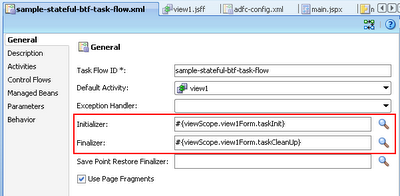
  2. Set the value expression with the pageFlowScope object in the initializer of the BTF.
  3. Set the value expression to null in the finalizer of the BTF to ensure objects are released.

The details of the steps are as follows:
  1. Define a string input parameter that will hold a unique value expression provided by the user.
    Figure 3: Input parameter definition of the string that represents a value expression.
    PageFlowScope is unique per instance of BTF, so it is the responsibility of the user(a developer) of the BTF to ensure that he is passing a unique externalStateValueHolder string value expression per region so that the region pageFlowScopeObjects will not collide which can lead to unexpected results.
  2. Set the value expression with the pageFlowScope object in the initializer of the BTF.
        public void taskInit() {
            //EXTERNAL_STATE_HOLDER is a string constant with value "externalStateHolder"
            String expression =
                (String)getPageFlowScope().get(EXTERNAL_STATE_HOLDER);
            if (expression != null) {
                JSFUtils.setManagedBeanValue(expression, getPageFlowScope());
            }
        }
    
  3. Set the value expression to null in the finalizer of the BTF to ensure objects are released.
        public void taskCleanUp() {
            String expression =
                (String)getPageFlowScope().get(EXTERNAL_STATE_HOLDER);
            if (expression != null) {
                //to ensure pageFlowScope is released upon unload of BTF
                JSFUtils.setManagedBeanValue(expression, null);
            }
        }
    
    Figure 4: Initializer and finalizer definition of the bounded task flow
Below are the other relevant artifacts in the prototype:
  • Region model definition
        <taskFlow id="samplestatefulbtftaskflow1"
                  taskFlowId="/WEB-INF/sample-stateful-btf-task-flow.xml#sample-stateful-btf-task-flow"
                  activation="deferred"
                  xmlns="http://xmlns.oracle.com/adf/controller/binding">
          <parameters>
            <parameter id="externalStateHolder"
                       value="sessionScope.region1StateHolder"/>
          </parameters>
        </taskFlow>
    
  • Toolbar button disabled attribute
        <af:commandToolbarButton text="Approve" id="ctb1"
               partialTriggers="r1:ctb1 r1:ctb2 r1:ctb3"
               disabled="#{sessionScope.region1StateHolder['editMode'] eq 'true'}"
               actionListener="#{viewScope.mainForm.approve}"/>
    

Prototype

You can download the sample application from here.

Resources

  • Initiate Control Flow Within A Region From Its Parent Page Functional Pattern

Caveat

Care should be taken when you are exposing the BTFs pageFlowScope to the outside world (outside the boundaries of the BTF), because it could lead your BTFs to unexpected inconsistent state. The solution just illustrate the concept and it can easily be tweak to exposed a much restricted Map object instead of the pageFlowScope.