Showing posts with label Patterns. Show all posts

Tuesday, October 26, 2010

Bounded Task Flows as Components with Exposed State or Attributes

Overview

Bounded Task Flows (BTFs) can be considered a breakthrough in again bringing the concept of web component reuse to a new level. BTFs can be package into ADF Library JAR files and placed into to a reusable component repository, in which they can be applied in multiple projects and/or applications. This document describes a way on how to make BTFs a more full-pledged interactive component by incorporating them with state and/or attributes.

Problem Description

BTFs have a way to communicate with other BTFs and their containing page through contextual events in which they can pass data as part of the event payload. They can also be navigated from outside through "queueActionEventInRegion()" method exposed by the RichRegion component. But BTF has a major shortcoming as a component, and that is, it does not have an exposed state or attributes.

Solution Description

Undeniably, pageFlowScope is where the internal state and attributes of BTFs are usually kept. As a matter of fact, if you define input parameters, JDeveloper will automatically create the value expressions which are in pageFlowScope. This pageFlowScope is unique per instance of the BTF and will last long from an instance initialization up to a return activity, fault, or explicit detachment(like setting the region with a different TaskFlowId), but is not accessible outside the BTF. This solution provides a way on how the attributes of a bounded task flow can be optionally exposed to other components of the page beyond the BTF boundary.

The User Experience

Figure 1: The main page "Approve" button is enabled when the bounded task flow is not on editMode.
Figure 2: The "Approve" button on the main page is disabled when the bounded task flow was on edit mode.

Artifacts

Exposing the BTF attributes represented by the BTF pageFlowScope can be done in three steps:
  1. Define a string input parameter that will hold a unique value expression provided by the user.
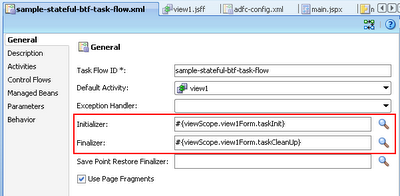
  2. Set the value expression with the pageFlowScope object in the initializer of the BTF.
  3. Set the value expression to null in the finalizer of the BTF to ensure objects are released.

The details of the steps are as follows:
  1. Define a string input parameter that will hold a unique value expression provided by the user.
    Figure 3: Input parameter definition of the string that represents a value expression.
    PageFlowScope is unique per instance of BTF, so it is the responsibility of the user(a developer) of the BTF to ensure that he is passing a unique externalStateValueHolder string value expression per region so that the region pageFlowScopeObjects will not collide which can lead to unexpected results.
  2. Set the value expression with the pageFlowScope object in the initializer of the BTF.
        public void taskInit() {
            //EXTERNAL_STATE_HOLDER is a string constant with value "externalStateHolder"
            String expression =
                (String)getPageFlowScope().get(EXTERNAL_STATE_HOLDER);
            if (expression != null) {
                JSFUtils.setManagedBeanValue(expression, getPageFlowScope());
            }
        }
    
  3. Set the value expression to null in the finalizer of the BTF to ensure objects are released.
        public void taskCleanUp() {
            String expression =
                (String)getPageFlowScope().get(EXTERNAL_STATE_HOLDER);
            if (expression != null) {
                //to ensure pageFlowScope is released upon unload of BTF
                JSFUtils.setManagedBeanValue(expression, null);
            }
        }
    
    Figure 4: Initializer and finalizer definition of the bounded task flow
Below are the other relevant artifacts in the prototype:
  • Region model definition
        <taskFlow id="samplestatefulbtftaskflow1"
                  taskFlowId="/WEB-INF/sample-stateful-btf-task-flow.xml#sample-stateful-btf-task-flow"
                  activation="deferred"
                  xmlns="http://xmlns.oracle.com/adf/controller/binding">
          <parameters>
            <parameter id="externalStateHolder"
                       value="sessionScope.region1StateHolder"/>
          </parameters>
        </taskFlow>
    
  • Toolbar button disabled attribute
        <af:commandToolbarButton text="Approve" id="ctb1"
               partialTriggers="r1:ctb1 r1:ctb2 r1:ctb3"
               disabled="#{sessionScope.region1StateHolder['editMode'] eq 'true'}"
               actionListener="#{viewScope.mainForm.approve}"/>
    

Prototype

You can download the sample application from here.

Resources

  • Initiate Control Flow Within A Region From Its Parent Page Functional Pattern

Caveat

Care should be taken when you are exposing the BTFs pageFlowScope to the outside world (outside the boundaries of the BTF), because it could lead your BTFs to unexpected inconsistent state. The solution just illustrate the concept and it can easily be tweak to exposed a much restricted Map object instead of the pageFlowScope.

Thursday, September 30, 2010

SDO: Implementing a HashMap like Service Data Objects

Introduction

I envisioned to create a Generic ADF Human Task Form to support all of our human task (workflow) activities, and in the solution that I thought of, I need an SDO HashMap.

For those who are not familiar, the ADF Human Task Form are remotely deployed bounded task flows (BTFs) that are being accessed by the Oracle BPM woklist app in showing the details of a listed task. The remotely deployed BTFs can support multiple human task as long as they have have identical payload elements. I will describe some more details in subsequent posts.

Problem Description

I need some sort of HashMap like SDO because I need to pass a parameterMap from a human task payload into the dynamic region inside my envisioned Generic ADF Human Task Form, but there is no such HashMap equivalent in SDO or in XML Schema. This post provides an implemented schema and classes to support a HashMap like SDO in Oracle SOA Suite 11g BPEL processes.

Artifacts

To create the SDO HashMap we need to have the following artifacts:
  1. MyMapSDO.xsd - Contains the definition of "MyMapSDO" and "MyEntrySDO" complex types to hold the list of entries and the key-value pairs respectively.
  2. MyEntrySDO.java - Java representation of the MyEntrySDO complex type.
  3. MyMapSDO.java - Java representation of the MyMapSDO complex type.
  4. MyEntrySDOImpl.java - implementation
  5. MyMapSDOImpl.java
  6. SimpleWrapperUtils.java - this class handles wrapping of simple types like string, integer, long , etc. to dataobjects as described in my previous post.
  • Below is the concrete "MyMapSDO.xsd" schema that contains both complex types:
    <?xml version="1.0" encoding="windows-1252" ?>
    <xsd:schema xmlns:xsd="http://www.w3.org/2001/XMLSchema"
                xmlns="http://soadev.blogspot.com/map"
                targetNamespace="http://soadev.blogspot.com/map"
                xmlns:sdoJava="commonj.sdo/java" sdoJava:package="soadev.sdo.sdohashmap.model">
       <xsd:import namespace="commonj.sdo/java"/>
       <xsd:complexType name="MyMapSDO">
          <xsd:sequence>
             <xsd:element name="entry" type="MyEntrySDO" minOccurs="0"
                          maxOccurs="unbounded"/>
          </xsd:sequence>
       </xsd:complexType>
       <xsd:complexType name="MyEntrySDO">
          <xsd:sequence>
             <xsd:element name="key" type="xsd:string" minOccurs="0"/>
             <xsd:element name="value" type="xsd:anyType" minOccurs="0"/>
          </xsd:sequence>
       </xsd:complexType>
       <xsd:element name="myMapSDO" type="MyMapSDO"/>
    </xsd:schema>
    
  • MyEntrySDO.java
    package soadev.sdo.sdohashmap.model;
    
    public interface MyEntrySDO {
        String getKey();
        void setKey(String key);
        Object getValue();
        void setValue(Object value);
    }
    
    
  • MyMapSDO.java
    
    package soadev.sdo.sdohashmap.model;
    
    import java.util.List;
    
    public interface MyMapSDO {
        List getEntry();
        void setEntry(List value);
    }
    
  • MyEntrySDOImpl.java
    
    package soadev.sdo.sdohashmap.model;
    
    import org.eclipse.persistence.sdo.SDODataObject;
    
    public class MyEntrySDOImpl extends SDODataObject implements MyEntrySDO {
        public String getKey() {
            return getString("key");
        }
    
        public void setKey(String key) {
            set("key", key);
        }
    
        public Object getValue() {
            return get("value");
        }
    
        public void setValue(Object value) {
            set("value", value);
        }
    }
    
  • MyMapSDOImpl.java
    
    package soadev.sdo.sdohashmap.model;
    
    import commonj.sdo.DataObject;
    
    import java.util.Collections;
    import java.util.HashMap;
    import java.util.List;
    
    import java.util.Map;
    
    import org.eclipse.persistence.sdo.SDODataObject;
    import static soadev.sdo.utils.SimpleTypeWrapperUtils.unwrap;
    
    public class MyMapSDOImpl extends SDODataObject implements MyMapSDO {
        public List getEntry() {
            return getList("entry");
        }
    
        public void setEntry(List value) {
            set("entry", value);
        }
        //EL reachable
        public Map<String, Object> getMap(){
            Map<String, Object> map = new HashMap<String, Object>();
            for(Object obj: getEntry()){
                MyEntrySDO entry = (MyEntrySDO)obj;
                map.put(entry.getKey(), unwrap((DataObject)entry.getValue()));
            }
            return map;
        }
    }
    

Testing ...

Below is a sample runner class to illustrate the use case:
package soadev.sdo.sdohashmap.main;

import commonj.sdo.helper.DataFactory;

import commonj.sdo.helper.XMLHelper;

import java.math.BigDecimal;

import java.util.HashMap;
import java.util.List;

import java.util.Map;

import oracle.jbo.common.sdo.SDOHelper;

import soadev.sdo.sdohashmap.model.MyEntrySDO;
import soadev.sdo.sdohashmap.model.MyMapSDO;
import soadev.sdo.sdohashmap.model.MyMapSDOImpl;
import soadev.sdo.sdohashmap.sampleentity.JobSDO;
import static soadev.sdo.utils.SimpleTypeWrapperUtils.*;

public class Runner {

    public static void main(String[] args) {
        try {
            SDOHelper.INSTANCE.defineSchema("soadev/sdo/sdohashmap/sampleentity/",
                                            "JobSDO.xsd");
            SDOHelper.INSTANCE.defineSchema("soadev/sdo/sdohashmap/model/",
                                            "MyMapSDO.xsd");
            MyMapSDO myMapSDO =
                (MyMapSDO)DataFactory.INSTANCE.create(MyMapSDO.class);
            MyEntrySDO entry =
                (MyEntrySDO)DataFactory.INSTANCE.create(MyEntrySDO.class);
            entry.setKey("param1");
            entry.setValue(wrap("SampleValue"));
            MyEntrySDO entry2 =
                (MyEntrySDO)DataFactory.INSTANCE.create(MyEntrySDO.class);
            entry2.setKey("param2");
            entry2.setValue(wrap(1));
            MyEntrySDO entry3 =
                (MyEntrySDO)DataFactory.INSTANCE.create(MyEntrySDO.class);
            entry.setKey("param1");
            JobSDO job = (JobSDO)DataFactory.INSTANCE.create(JobSDO.class);
            job.setJobId("SOADev");
            job.setJobTitle("SOA Developer");
            job.setMaxSalary(20000L);
            job.setMinSalary(10000L);
            entry3.setKey("param3-job");
            entry3.setValue(job);
            MyEntrySDO entry4 =
                (MyEntrySDO)DataFactory.INSTANCE.create(MyEntrySDO.class);
            entry4.setKey("param4");
            entry4.setValue(wrap(100L));
            MyEntrySDO entry5 =
                (MyEntrySDO)DataFactory.INSTANCE.create(MyEntrySDO.class);
            entry5.setKey("param5");
            entry5.setValue(wrap(true));
            MyEntrySDO entry6 =
                (MyEntrySDO)DataFactory.INSTANCE.create(MyEntrySDO.class);
            entry6.setKey("param6");
            entry6.setValue(wrap(200.50));
            MyEntrySDO entry7 =
                (MyEntrySDO)DataFactory.INSTANCE.create(MyEntrySDO.class);
            entry7.setKey("param7");
            entry7.setValue(wrap(new BigDecimal("550.90")));
            List entries = myMapSDO.getEntry();
            entries.add(entry);
            entries.add(entry2);
            entries.add(entry3);
            entries.add(entry4);
            entries.add(entry5);
            entries.add(entry6);
            entries.add(entry7);
            
            //print XML representation
            String xmlFragment = XMLHelper.INSTANCE.save((MyMapSDOImpl)myMapSDO, null, "myMapSDO");
            System.out.println(xmlFragment);
            
            //get map Object
            Map<String, Object> parameterMap = ((MyMapSDOImpl)myMapSDO).getMap();
            for(Map.Entry<String, Object> mapEntry: parameterMap.entrySet()){
                System.out.println("key: " + mapEntry.getKey());
                System.out.println("value: " + mapEntry.getValue());
                System.out.println("value class: " + mapEntry.getValue().getClass());
                System.out.println("-----------------------------------------------");
            }

        } catch (Exception ex) {
            ex.printStackTrace();
        }
    }
}
Below is the output in the console after running the runner class above:
C:\Oracle\11gR1PS2\jdk160_18\bin\javaw.exe -client -classpath ////--removed very long classpath---////
Djavax.net.ssl.trustStore=C:\Oracle\11gR1PS2\wlserver_10.3\server\lib\DemoTrust.jks soadev.sdo.sdohashmap.main.Runner
[EL Warning]: 2010-09-30 03:22:46.25--SDOUtil: Generated Type [ChangeSummary] conflicts with SDO specification naming rules for [ChangeSummary] and should be renamed.
<?xml version="1.0" encoding="UTF-8"?>
<myMapSDO xsi:type="ns1:MyMapSDO" xmlns:ns1="http://soadev.blogspot.com/map" xmlns:xsi="http://www.w3.org/2001/XMLSchema-instance">
   <entry>
      <key>param1</key>
      <value xsi:type="ns0:string" xmlns:ns0="http://www.w3.org/2001/XMLSchema">SampleValue</value>
   </entry>
   <entry>
      <key>param2</key>
      <value xsi:type="ns0:int" xmlns:ns0="http://www.w3.org/2001/XMLSchema">1</value>
   </entry>
   <entry>
      <key>param3-job</key>
      <value xsi:type="ns0:JobSDO" xmlns:ns0="http://soadev.blogspot.com/sampleentity">
         <jobId>SOADev</jobId>
         <jobTitle>SOA Developer</jobTitle>
         <maxSalary>20000</maxSalary>
         <minSalary>10000</minSalary>
      </value>
   </entry>
   <entry>
      <key>param4</key>
      <value xsi:type="ns0:long" xmlns:ns0="http://www.w3.org/2001/XMLSchema">100</value>
   </entry>
   <entry>
      <key>param5</key>
      <value xsi:type="ns0:boolean" xmlns:ns0="http://www.w3.org/2001/XMLSchema">true</value>
   </entry>
   <entry>
      <key>param6</key>
      <value xsi:type="ns0:double" xmlns:ns0="http://www.w3.org/2001/XMLSchema">200.5</value>
   </entry>
   <entry>
      <key>param7</key>
      <value xsi:type="ns0:decimal" xmlns:ns0="http://www.w3.org/2001/XMLSchema">550.90</value>
   </entry>
</myMapSDO>

key: param1
value: SampleValue
value class: class java.lang.String
-----------------------------------------------
key: param2
value: 1
value class: class java.lang.Integer
-----------------------------------------------
key: param4
value: 100
value class: class java.lang.Long
-----------------------------------------------
key: param5
value: true
value class: class java.lang.Boolean
-----------------------------------------------
key: param6
value: 200.5
value class: class java.lang.Double
-----------------------------------------------
key: param7
value: 550.90
value class: class java.math.BigDecimal
-----------------------------------------------
key: param3-job
value: soadev.sdo.sdohashmap.sampleentity.JobSDOImpl@1c208b0
value class: class soadev.sdo.sdohashmap.sampleentity.JobSDOImpl
-----------------------------------------------
Process exited with exit code 0.

Prototype

You can download the sample application from here.

What's Next?

In subsequent post, I will show how this SDO HashMap be used through Java Embedding inside a BPEL process. I will also show how to initialize an SDO entity with an XML fragment. And... I will also describe a problem that I later realize in the process of this goal of having a Generic ADF Human Task Form - there is always workaround though :-) .

Wednesday, September 1, 2010

ADF Faces RC: Generic Query and ListOfValues Model for EJBs

Overview

The <af:query> and <af:inputListOfValues> components of ADF Faces RC are a must-have for applications, but if you are not using ADF Business Components, then you face the challenge of implementing your own query and listOfValues models. This pattern provides an implemented reusable model that you can readily adapt to your enterprise needs when you are using EJBs.

Problem Description

The query and listOfValues models are fairly complex. To build a query model alone, you need to extend and implement at least six abstract classes as depicted in the diagram below:
Figure 1: Query Model Class Diagram
Plus some additional classes to build the listOfValues model as depicted below:
Figure 2: ListOfValues Model Class Diagram
If you try to look into how these were implemented for ADF BC, you could easily get lost in the details, especially that our focus is to build business applications and not UI components, on the other hand, if you look into the DemoQueryModel and DemoListOfValuesModel implemented in the adffacesdemo, then those implementations were suggesting "I'm stiff and useless, don't dare create something like me.". I am telling this because I have been into these hardships.

Technical Pattern Description

Let us get back to the basic requirement and the existing set of capabilities of the technologies that we use. The basic requirement is to provide the end-user a component where he can set criteria based on existing attributes and execute query to get a filtered result.
The following are the existing capabilities:
  • EJB's JPQL supports dynamic queries so we can create a session bean method that accepts a JPQL statement, as in the case of "queryByRange()", and create EJB DataControls out of them.
  • We can drag the data control on the page to create tables. In the process, a tree binding is created in the page definition file. In this tree binding, we can access the relevant attributes and accessors of the information that we are interested in. On the same tree binding, we can get the resulting class, and the corresponding CollectionModel.
  • By implementing some sort of dummy Map interface, we can allow passing of parameters through EL.
  • When we declare our model as managed beans, we can inject managed properties. Through managed properties, we can pass the the unique list of saved search per query and the object that will handle persistence.
From the requirement and capabilities described above, I came up with a solution that is simple to use, reusable, and manageable from the complexity perspective. This solution has one basic requirement - a valid treeBinding defined in the pageDefinition file that is based on a method that accepts a "jpqlStmt" parameter. The solution hits three birds in one shot, because it supports the QueryModel, the ListOfValuesModel, and a Dynamic Converter to convert the string input into appropriate entity objects.

The User Experience

The saved searches that are injected on the managed beans will be displayed on the saved search list:
Figure 3: List page showing a query defined from managed bean

If no saved search is injected, the system will generate one, named "System Generated", setting the first attribute defined in the pageDefinition file as a search field.
Figure 4: Job list page showing a query with a system generated saved search.

Users will be able to use the accessor attributes as part of the search criteria. The displayed label supports internationalization.
Figure 5: Add Fields menu showing list of attributes including those of the accessors. 

Search is NOT case-sensitive.
Figure 6: Case In-sensitive search.

Aside from the primary components, the query panel can have selectComboBox, selectOneChoice, and inputListOfValues components as well (inputComboBoxListOfValues can be easily supported too).
Figure 7: A launched job.Job Id inputListOfValues  from the query panel.
Displayed below are three inputListOfValues component based on the same ListOfValuesModel class but different treeBindings.
Figure 8: Job, department, and manager LOVs based on the same model class.

Below is a launched Job Search. Selections made here are ensured to be easily converted to objects by using the dynamic converter.
Figure 9: A launched Job Search having the default system generated criterion

Artifacts

The QueryLOV class alone contains more than a thousand lines of code, so I leave the sample application which do have comments to speak of its own. Instead, in this section, I will show the artifacts in using the solution:
  • The employeeQuery managed bean declaration in the employee-list-task-flow:
    Figure 10: The employeeQuery managed bean definition in employee-list-task-flow.

    The employeeQuery has a defined "systemSavedSearchDefList" managed property which is a list. Inside this list is a value that points to another managed bean named "savedSearch1". Inside "savedSearch1" is a list with a value referencing to managed bean "searchField1". These managed properties are optional. If you did not specify a managed saved search list property, the QueryLOV will generate a default.

    The "supplementaryMap" property is a map with an entry that points to the jobLOV managed bean. This property supplements the model that made possible the presence of the Job inputListOfValue component on the query panel of the employee search.

  • Below is the source of the query component as used in the employee_list.jsff search page:
    <af:query headerText="Search" disclosed="true" id="q1"
        model="#{pageFlowScope.employeeQuery.param['bindings.Employee'].queryModel}"
        value="#{pageFlowScope.employeeQuery.param['bindings.Employee'].currentDescriptor}"
        resultComponentId="::pc1:t1"
        queryListener="#{pageFlowScope.employeeQuery.processQuery}"/>
    
    The 'bindings.Employee' is the name of the tree binding in the page definition file that is based on a methodAction "findEmployeesByCriteria" that accepts a "jpqlStmt" parameter.

  • Below is the source of the Job Search LOV in employee_details.jsff form page.
    <af:inputListOfValues label="Job"
        popupTitle="Search and Result Dialog" id="ilov2" searchDesc="Job Search"
        model="#{pageFlowScope.jobLOV.param['bindings.Job'].listOfValuesModel}"
        value="#{bindings.findEmployeeByIdIterator.currentRow.dataProvider.job}"
        converter="#{pageFlowScope.jobLOV.param['bindings.Job'].convert['jobId']}"
        autoSubmit="true" readOnly="#{!pageFlowScope.editMode}"/>
    
    The same as the 'bindings.Employee' above, the 'bindings.Job is the name of the tree binding in the page definition file that is based on a methodAction "findJobsByCriteria" that accepts a "jpqlStmt" parameter.
    The string 'jobId' is passed as parameter in .convert['jobId'] so that the dynamic converter will know how to transform our strings into Job objects.
    It is also important that you override the toString() method of your entities to return the id (jobId in the case of Job)representation of your object.

Pattern Implementation

To implement this Reusable Query and ListOfValues Model into your existing application, do the following steps:
  1. Download the accompanying sample application.
  2. Inside your existing application, open the EJBQueryLOV project by invoking "Open Project" menu and navigating to the directory of the sample application.
  3. Open project properties of your ViewController project and add a dependency on the EJBQueryLOV build output.
  4. The EJBQueryLOV projects has some dependency on the utility classes in the Utils project in the sample application. You could add the JSFUtils.jar inside the deploy folder into your classpath.

Prototype

You can download the sample application with the reusable query and listOfValues model project from here.

Known Issues

Sometimes, invoking the "Search" button on the Query component do not raise the necessary lifecycle process that will trigger the result component to refresh. In this case, the "Search" button needs to be invoked again.

When you drag a data control with a resulting entity that do have a recursive relation to itself - like in the case of Employee with attribute manager, in which manager is also an employee, for some reasons, JDeveloper do not create a separate node binding for the manager inside the tree binding in the pageDefinition file. In this case, you need to manually add the necessary node definition to support the query by manager attributes and to comply with underlying assumption of the QueryLOV that the sequence of the defined accessors in the primary node definition of the tree binding is laid out on the same sequence in the subsequent nodes.
To illustrate the case please see the default generated code VS. the necessary modified version of the tree binding
Generated Default:
    <tree IterBinding="findEmployeesByCriteriaIterator" id="Employee">
      <nodeDefinition DefName="src.model.Employee" Name="Employee0">
        <AttrNames>
          <Item Value="employeeId"/>
          <Item Value="firstName"/>
          <Item Value="lastName"/>
          <Item Value="email"/>
          <Item Value="commissionPct"/>
          <Item Value="hireDate"/>
          <Item Value="phoneNumber"/>
          <Item Value="salary"/>
        </AttrNames>
        <Accessors>
          <Item Value="department"/>
          <Item Value="manager"/>
          <Item Value="job"/>
        </Accessors>
      </nodeDefinition>
      <nodeDefinition DefName="src.model.Department" Name="Employee1">
        <AttrNames>
          <Item Value="departmentId"/>
          <Item Value="departmentName"/>
          <Item Value="locationId"/>
        </AttrNames>
      </nodeDefinition>
      <nodeDefinition DefName="src.model.Job" Name="Employee2">
        <AttrNames>
          <Item Value="jobId"/>
          <Item Value="jobTitle"/>
          <Item Value="maxSalary"/>
          <Item Value="minSalary"/>
        </AttrNames>
      </nodeDefinition>
    </tree>

The necessary modified version to comply with the QueryLOV assumption:
    <tree IterBinding="findEmployeesByCriteriaIterator" id="Employee">
      <nodeDefinition DefName="src.model.Employee" Name="Employee0">
        <AttrNames>
          <Item Value="employeeId"/>
          <Item Value="firstName"/>
          <Item Value="lastName"/>
          <Item Value="email"/>
          <Item Value="commissionPct"/>
          <Item Value="hireDate"/>
          <Item Value="phoneNumber"/>
          <Item Value="salary"/>
        </AttrNames>
        <Accessors>
          <Item Value="department"/>
          <Item Value="manager"/>
          <Item Value="job"/>
        </Accessors>
      </nodeDefinition>
      <nodeDefinition DefName="src.model.Department" Name="department">
        <AttrNames>
          <Item Value="departmentId"/>
          <Item Value="departmentName"/>
          <Item Value="locationId"/>
        </AttrNames>
      </nodeDefinition>
       <nodeDefinition DefName="src.model.Employee" Name="manager">
        <AttrNames>
          <Item Value="employeeId"/>
          <Item Value="firstName"/>
          <Item Value="lastName"/>
          <Item Value="email"/>
          <Item Value="commissionPct"/>
          <Item Value="hireDate"/>
          <Item Value="phoneNumber"/>
          <Item Value="salary"/>
        </AttrNames>
      </nodeDefinition>
      <nodeDefinition DefName="src.model.Job" Name="job">
        <AttrNames>
          <Item Value="jobId"/>
          <Item Value="jobTitle"/>
          <Item Value="maxSalary"/>
          <Item Value="minSalary"/>
        </AttrNames>
      </nodeDefinition>
    </tree>
Note that the node names are not necessary but the sequence. The sequence of the node definition after the primary should be the same as the sequence of the defined accessors (department, manager, then job).

Related Patterns

The sample application is based on the ADF UI Shell Functional Pattern.


Authors Notes

I would to recognize other people who also have contributed on the evolution of this solution, specifically, Java Powers of http://javainthedesert.blogspot.com/.